
Geometric construction of a cuboid’s volume with dimension labeling
Loading the math board and drawing, please wait…
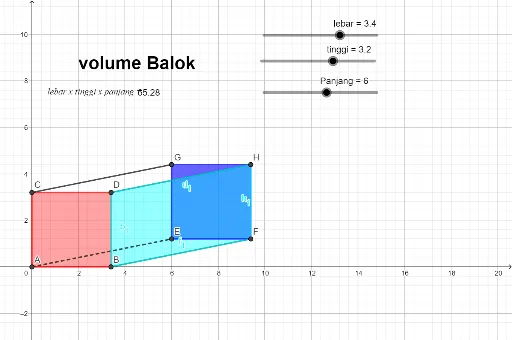
This example constructs a cuboid (box-like solid) by defining its key vertices and edges, then labels the dimensions (length, width, height) to visually link them to the resulting volume. It demonstrates the core relationship of solid-geometry volume as a product of three perpendicular dimensions (e.g., V = length × width × height) alongside parameter-based geometric interpretation. Construction highlights: it uses the GeoGebra command Intersect to obtain essential intersection points for accurate topology; Polygon to build the visible faces from vertex sets (such as A, B, C, D); and Segment to create the defining edges connecting those points. The model also includes parameter and result objects (e.g., Panjang, lebar, tinggi, and volume) together with text annotation objects (text1, text2, text3) to present the measurement-to-volume connection clearly. Suitable for upper secondary students and introductory college geometry lessons, especially for teaching volume formulas, geometric construction logic, and parameter labeling in GeoGebra.
GeoGebra Commands & Parameters
Intersect(xAxis, yAxis) → APolygon(A, B, D, C) → q1, a, b, d, cPolygon(G, H, F, E) → q2, g, h, f, eSegment(C, G) → iSegment(D, H) → jSegment(A, E) → kSegment(B, F) → lPolygon(D, H, F, B) → q3, d_1, h_1, f_1, b_1
AI Drawing Prompt Reference
Create a perspective drawing of a cuboid (box-like solid) made from several connected quadrilateral faces. Start by drawing two perpendicular axes and use their intersection to place the key corner points. Construct one base quadrilateral from four corner points, then build the corresponding quadrilateral face on the opposite side using the matching upper/bottom corner set. Connect corresponding corners with edge segments to form the cuboid’s visible frame, and add the remaining side quadrilateral(s) so the exterior is fully enclosed by multiple polygons.
The prompt above was compiled from the original drawing commands and is for reference only.