
Geometric Construction: Circles, Angle Bisectors, and Intersections for Conic-Re
Loading the math board and drawing, please wait…
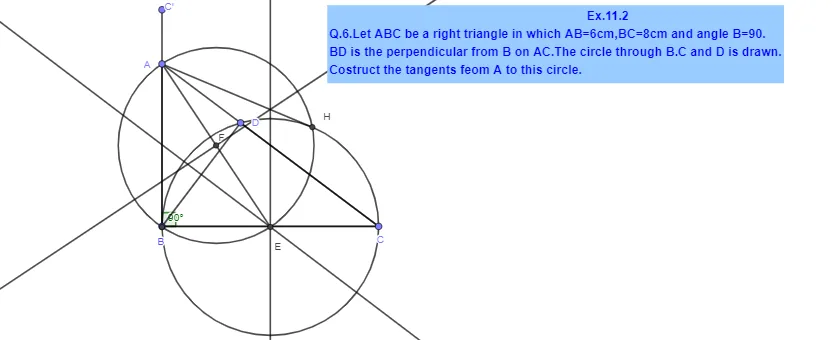
This example demonstrates a step-by-step geometric construction that uses controlled angle and distance constraints to build specific points and lines in the plane, supporting the exploration of conic-section–related features. The core ideas include geometric construction, the construction and use of angles (notably angle measurement and angle bisectors), perpendicular/orthogonal constraints, midpoint/ bisector-style symmetry reasoning, and the role of circles and intersection points in fixing exact locations. Construction is carried out using GeoGebra commands from the provided construction summary: Point (creating key points such as B, C, A, D, E), Segment (defining and connecting segments that encode distances/relationships), Rotate (generating rotated positions or directions), Angle (forming the angle α and related angle measures), OrthogonalLine (building perpendicular lines), LineBisector (constructing angle bisectors or equivalent dividing lines), Intersect (computing intersection points to determine new construction elements), and Circle (using circles to enforce locus/distance constraints). The listed objects (including α and multiple auxiliary lines/labels) help visualize the constructed configuration. Suitable for high-school advanced geometry learners or early undergraduate students learning construction techniques and their applications to conic-section geometry and graphing.
GeoGebra Commands & Parameters
Point(Circle[B, 8]) → CSegment(B, C) → fRotate(C, 90°, B) → C'Angle(C, B, C') → αSegment(B, C') → gPoint(Circle[B, 6]) → ASegment(B, A) → hSegment(A, C) → iPoint(i) → DOrthogonalLine(D, i) → jSegment(B, D) → kSegment(D, C) → lSegment(C, B) → mLineBisector(k) → nLineBisector(f) → pIntersect(n, p) → ECircle(E, B) → cSegment(A, E) → qLineBisector(q) → rIntersect(q, r) → FCircle(F, A) → dIntersect(c, d) → G, H, ,Segment(A, H) → s
AI Drawing Prompt Reference
Draw a geometric construction diagram containing points B, C, A, D, E. The diagram includes circles, line segments, rotations, angle measurements, perpendicular lines, angle bisectors, and intersection points. The construction order should be: first draw circles to obtain points C and A; rotate point C around B by 90 degrees to get C'; measure angle α; draw a line segment connecting B and C'; draw a perpendicular line through D and line segment i; draw angle bisectors n and p; find intersection point E; then draw circles c and d; find intersection point F; finally find intersection points G and H of circles c and d, and connect A and H.
The prompt above was compiled from the original drawing commands and is for reference only.