
Tactical Game: Geometric Strategy with Centroid and Symmetry
Loading the math board and drawing, please wait…
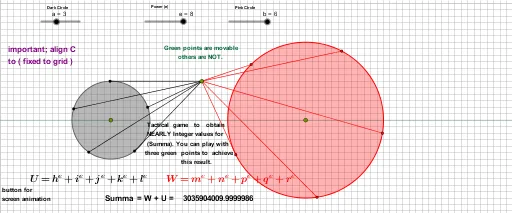
This interactive GeoGebra example, titled 'Tactical Game', demonstrates a complex geometric construction involving circles, points, segments, rotations, angles, and lines. It builds a figure that incorporates centroids, circumcircles, geometric distributions, geometric means, power functions, logarithms, symmetry, and geometric transformations, along with cubes, exponents, ratios, and cuboids. The construction uses commands such as Circle, Point, Segment, Rotate, Angle, and Line, creating numerous objects (e, G, E, a, c, H, h, H', l, H'', k, H''', j, K, i, B, A, b, F, d, I, J, α, β, γ, δ, J', ε, J'', ζ, J''', η, L, θ, m, n, p, q, r, W) that are rotated and connected to form symmetric patterns. This likely explores optimal positions or strategic placements in a game-like context. It is suitable for high school and above, serving as a rich resource for teaching geometric transformations, symmetry, centroid properties, and the integration of functions with geometry, as well as for mathematical modeling or gamified learning.
GeoGebra Commands & Parameters
Circle(E, a) → cPoint(c) → HSegment(H, G) → hRotate(H, 72°, E) → H'Segment(H', G) → lRotate(H', 72°, E) → H''Segment(H'', G) → kRotate(H'', 72°, E) → H'''Segment(H''', G) → jRotate(H''', 72°, E) → KSegment(K, G) → iCircle(F, b) → dPoint(d) → IPoint(d) → JAngle(H, E, H') → αAngle(H', E, H'') → βAngle(H'', E, H''') → γAngle(H''', E, K) → δRotate(J, 72°, F) → J'Angle(J, F, J') → εRotate(J', 72°, F) → J''Angle(J', F, J'') → ζRotate(J'', 72°, F) → J'''Angle(J'', F, J''') → ηRotate(J''', 72°, F) → LAngle(J''', F, L) → θSegment(J, G) → mSegment(L, G) → nSegment(J', G) → pSegment(J'', G) → qSegment(J''', G) → rLine(C, D) → f
AI Drawing Prompt Reference
Draw a complex geometric figure with multiple circles, points, and line segments. Start with a circle, then draw points on its circumference and connect these points to a fixed point to form line segments. Rotate each line segment by 72 degrees around the fixed point, creating new segments and points, and repeat this four times to form a symmetric pattern. Meanwhile, based on another circle, draw multiple points and rotate them by 72 degrees to create another set of symmetric patterns. Finally, connect these points and segments, and draw a line through two fixed points to showcase geometric transformations and symmetry.
The prompt above was compiled from the original drawing commands and is for reference only.