
Geometric Construction and Conic Sections Analysis
Loading the math board and drawing, please wait…
In collections
geometriadinamica.es
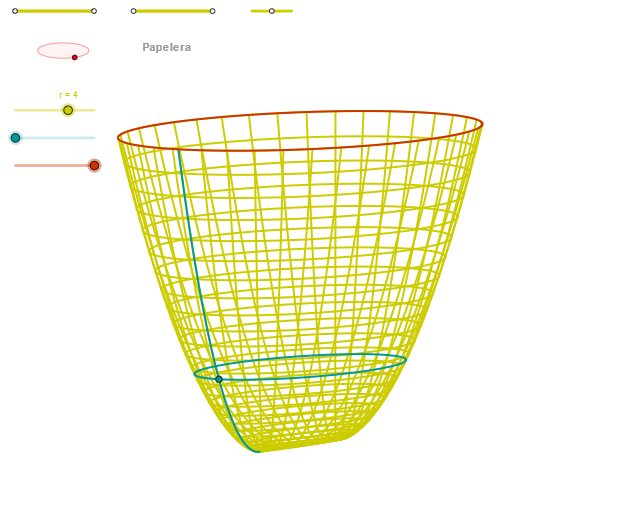
This example demonstrates how to analyze tangent lines and intersection points of conic sections through geometric construction. Key mathematical concepts include tangent properties, conic section equations, and coordinate geometry methods. Construction involves using GeoGebra commands such as Segment, OrthogonalLine, Circle, Intersect, Ellipse to build the figures. Suitable for high school students or undergraduate students learning geometric construction techniques and coordinate geometry applications.
GeoGebra Commands & Parameters
Segment(Q3, Q4) → p2Point(p2) → P3Segment(P3, Q4) → p4Point(p4) → P4Segment(Q1, Q2) → p1Point(p1) → P1Segment(P1, Q2) → p3Point(p3) → P2OrthogonalLine(C, xAxis) → zz2Circle(C, 0.62) → zz0Intersect(zz0, zz2, 1) → ZZ4Intersect(zz0, zz2, 2) → ZZ3Ellipse(ZZ3, ZZ4, 0.65) → zElipse2Point(zElipse2) → ZIntersect(zElipse2, zz2) → ZZ7, ZZ8Angle(ZZ8, C, Z) → zAngIncOrthogonalLine(C, yAxis) → zz1Intersect(zz0, zz1, 2) → ZZ2Intersect(zz0, zz1, 1) → ZZ1Ellipse(ZZ1, ZZ2, 0.65) → zElipse1Point(zElipse1) → XYIntersect(zElipse1, zz1) → ZZ5, ZZ6Angle(ZZ6, C, XY) → zAngRotSegment(Q5, Q6) → p5Point(p5) → P5Segment(ZZ5, ZZ6) → zz4Segment(ZZ7, ZZ8) → zz3Intersect(zElipse2, zElipse1, 1) → zPunto1Intersect(zElipse2, zElipse1, 4) → zPunto2Segment(zPunto1, zPunto2) → zSeg2CurveCartesian((r / 2 * ((((b + v) * cos(α)) * sin(zAngRot)) + ((v * sin(α)) * cos(zAngRot)))), (r / 2 * (((((-(b + v)) * cos(α)) * cos(zAngRot)) * sin(zAngInc)) + (((v * sin(α)) * sin(zAngRot)) * sin(zAngInc)) + ((a * v^(2)) * cos(zAngInc)))) - 3, v, v1, v2) → curva2CurveCartesian((r / 2 * ((((b + β) * cos(u)) * sin(zAngRot)) + ((β * sin(u)) * cos(zAngRot)))), (r / 2 * (((((-(b + β)) * cos(u)) * cos(zAngRot)) * sin(zAngInc)) + (((β * sin(u)) * sin(zAngRot)) * sin(zAngInc)) + ((a * β^(2)) * cos(zAngInc)))) - 3, u, u1, u2) → a1CurveCartesian((r / 2 * ((((b + 1) * cos(u)) * sin(zAngRot)) + (sin(u) * cos(zAngRot)))), (r / 2 * (((((-(b + 1)) * cos(u)) * cos(zAngRot)) * sin(zAngInc)) + ((sin(u) * sin(zAngRot)) * sin(zAngInc)) + (a * cos(zAngInc)))) - 3, u, u1, u2) → curva1Sequence(CurveCartesian[(r / 2 * ((((b + v) * cos(u)) * sin(zAngRot)) + ((v * sin(u)) * cos(zAngRot)))), (r / 2 * (((((-(b + v)) * cos(u)) * cos(zAngRot)) * sin(zAngInc)) + (((v * sin(u)) * sin(zAngRot)) * sin(zAngInc)) + ((a * v^(2)) * cos(zAngInc)))) - 3, v, v1, v2], u, u1, u2, (2 * paso)) → list2Sequence(CurveCartesian[(r / 2 * ((((b + v) * cos(u)) * sin(zAngRot)) + ((v * sin(u)) * cos(zAngRot)))), (r / 2 * (((((-(b + v)) * cos(u)) * cos(zAngRot)) * sin(zAngInc)) + (((v * sin(u)) * sin(zAngRot)) * sin(zAngInc)) + ((a * v^(2)) * cos(zAngInc)))) - 3, u, u1, u2], v, v1, v2, paso) → list1
AI Drawing Prompt Reference
Draw a geometric figure with two intersecting ellipses and auxiliary construction lines. Start by taking points on axes and connecting them into segments, then place points on these segments. Construct perpendicular lines to the axes and a circle, using intersections to define two ellipses rotated about different axes. Place a point on each ellipse and measure angles from the center. Connect the ellipse-axis intersection points with segments, find the two intersection points of the ellipses, and join them with a segment. Finally, generate multiple curve families using parametric equations based on the rotation angles, creating a dynamic surface mesh.
The prompt above was compiled from the original drawing commands and is for reference only.