
Geometric Addition of Two Complex Numbers
Loading the math board and drawing, please wait…
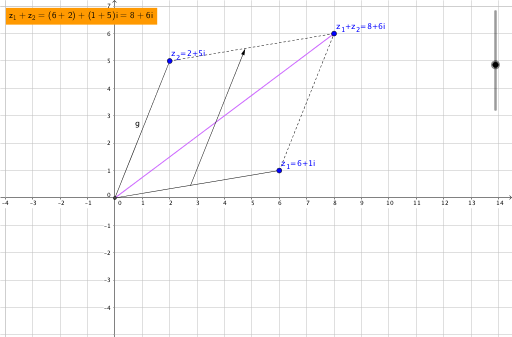
This example demonstrates the geometric representation of the addition of two complex numbers. Key mathematical concepts include the representation of complex numbers and vector addition. By constructing vectors and using the intersect command, the process of complex number addition is visually illustrated. Suitable for students in middle school and above to learn about complex numbers and vectors.
GeoGebra Commands & Parameters
Intersect(xAxis, yAxis) → BSegment(B, A) → fSegment(C, B) → gSegment(C, D) → hSegment(A, D) → iSegment(B, D) → jVector((0, 0) + (t * A), (0, 0) + (t * A) + C) → u
AI Drawing Prompt Reference
Draw a geometric representation of the addition of two complex numbers, including coordinate axes and vectors representing complex numbers. Start by plotting the intersection point of the axes, then draw two vectors from the origin representing the complex numbers. Connect these points with line segments and add a final segment to show the sum of the two complex numbers, clearly illustrating the vector addition process.
The prompt above was compiled from the original drawing commands and is for reference only.