
Dynamic Geometric Illustrator of a Function's Derivative at a Point
Loading the math board and drawing, please wait…
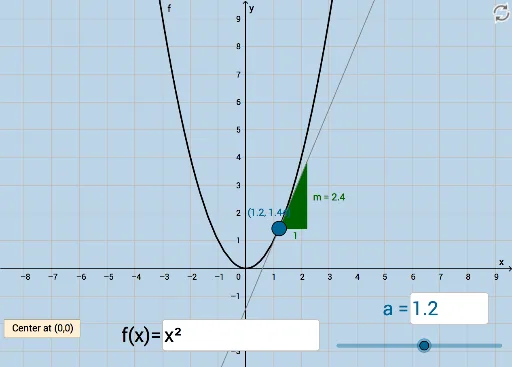
This example demonstrates the derivative of a function at a specific point using dynamic geometry, illustrating the relationship between the tangent line, secant line, and the function graph. Key math concepts include derivative, secant line, tangent function, and slope. It utilizes GeoGebra commands Tangent, Slope, Textfield, and Intersect with objects like a, f, A, g, m, InputBox1, InputBox2, button1, f', h, B, b. Suitable for high school mathematics education to understand the geometric meaning and dynamic variation of derivatives.
GeoGebra Commands & Parameters
Tangent(A, f) → gSlope(g) → mTextfield(f) → InputBox1Textfield(a) → InputBox2Intersect(f', h, (1.2, 2.4)) → B
AI Drawing Prompt Reference
Draw the derivative of a function f at point a. First, plot the graph of function f, then draw the tangent line g at point a and display its slope m. Next, input the values of function f and point a, and finally find the intersection point B of function f' and line h on the x-axis.
The prompt above was compiled from the original drawing commands and is for reference only.