
GeoGebra PieChart Command Tutorial: Data Visualization with TableText
Loading the math board and drawing, please wait…
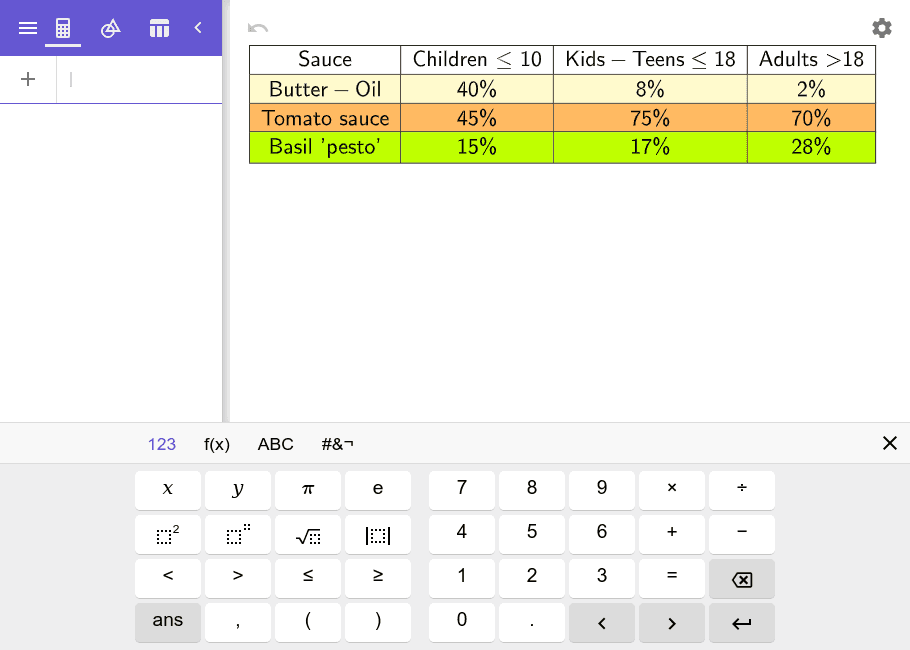
This example demonstrates how to create pie charts (circle charts) in GeoGebra for data visualization. The core mathematical concepts include graphical data representation, proportional distribution, and statistical chart interpretation. The construction uses the TableText command to process table objects (A1-D4 row/column data, testo2 text, etc.), converting numerical data into intuitive sector statistical graphs. Suitable for middle and high school mathematics statistics and probability teaching, higher education data demonstration, and teachers creating teaching materials to help students understand the proportional relationships between parts and wholes and data distribution characteristics.
GeoGebra Commands & Parameters
TableText({{A1, B1, C1, D1}, {A2, B2, C2, D2}, {A3, B3, C3, D3}, {A4, B4, C4, D4}}, "|_cccc") → testo2
AI Drawing Prompt Reference
Create a pie chart that visualizes proportional data from a four-by-four table of numerical values. The chart consists of multiple sectors, each with an angle proportional to its corresponding value, together forming a complete circle. The data originates from a table with four rows and four columns, which is converted into this statistical graph. The graphic should clearly show the relative proportions of each part, suitable for teaching statistics or demonstrating data distribution.
The prompt above was compiled from the original drawing commands and is for reference only.