
GeoGebra Orthocenter Construction
Loading the math board and drawing, please wait…
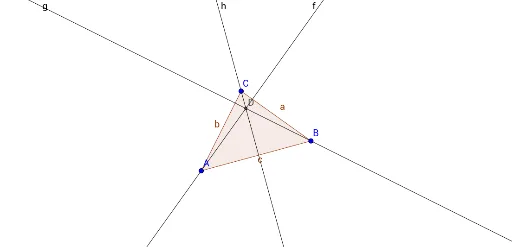
① This GeoGebra example demonstrates the classic geometric phenomenon that the three altitudes of any triangle intersect at a single point, known as the orthocenter. ② The core mathematical concept is the orthocenter of a triangle, involving definitions of altitudes, perpendicularity, and the concurrency of three lines, with extensions to how the orthocenter's position changes for acute, right, and obtuse triangles. ③ Construction details: The Polygon command creates triangle ABC, the OrthogonalLine command draws perpendiculars from each vertex to the opposite side (the altitudes), and the Intersect command finds the intersection point D of two altitudes, which is the orthocenter; objects include vertices A, B, C, triangle t1, sides c, a, b, altitude lines f, g, h, and point D. ④ Suitable for middle and high school students learning triangle properties, geometric construction, and dynamic exploration, as well as for teachers demonstrating the relationship between the orthocenter and triangle shape in class.
GeoGebra Commands & Parameters
Polygon(A, B, C) → t1, c, a, bOrthogonalLine(A, a) → fOrthogonalLine(B, b) → gOrthogonalLine(C, c) → hIntersect(f, g) → D
AI Drawing Prompt Reference
Draw an arbitrary triangle with its three vertices clearly marked. From each vertex, construct a perpendicular line to the opposite side, creating three altitudes. These three altitude lines intersect at a single point, known as the orthocenter. Use distinct colors for each altitude and clearly label the orthocenter. The figure should include the triangle, the three altitudes, and the orthocenter point, with a clean layout that makes it easy to observe how the orthocenter relates to the triangle's shape.
The prompt above was compiled from the original drawing commands and is for reference only.