
GeoGebra Geometry Construction Example: Angles & Probability
Loading the math board and drawing, please wait…
In collections
Dynamic Geometry Study Tasks
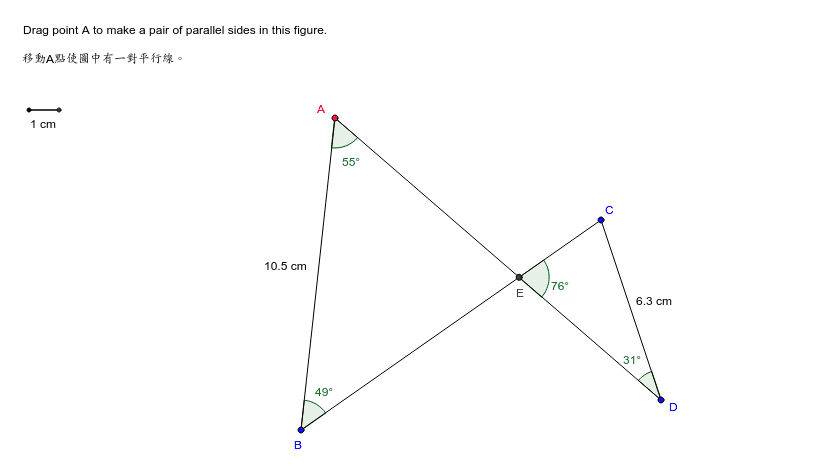
This example dynamically demonstrates angles, conditional probability, and geometric relationships, visually showcasing the application of mathematical concepts. Core concepts include angle measurement, conditional probability calculation, interest calculation, difference and slope, correlation analysis, and fraction operations. Construction highlights the use of GeoGebra commands/objects like Segment, Angle, Intersect, and Midpoint. Suitable for high school mathematics teaching, aiding in the practice and understanding of geometric construction and probability statistics.
GeoGebra Commands & Parameters
Segment(A, B) → aSegment(B, C) → bSegment(C, D) → cSegment(D, A) → dAngle(B, A, D) → αAngle(C, B, A) → βIntersect(b, d) → EAngle(D, E, C) → γAngle(C, D, A) → δMidpoint(A, B) → FMidpoint(C, D) → GSegment(H, I) → e
AI Drawing Prompt Reference
Draw a quadrilateral by connecting four points to form sides ABCD, measure and label angles ∠BAD and ∠ABC, find the intersection point E of sides AB and CD, measure and label angles ∠DEC and ∠DCA, calculate and mark the midpoints F and G of angles, connect midpoints F and G to form line e, showcasing angle relationships and intersection points to demonstrate geometric construction and probability statistics.
The prompt above was compiled from the original drawing commands and is for reference only.