
GeoGebra Geometry and Probability: Triangle and Distribution Interaction
Loading the math board and drawing, please wait…
In collections
Constructions for Problem Set 2
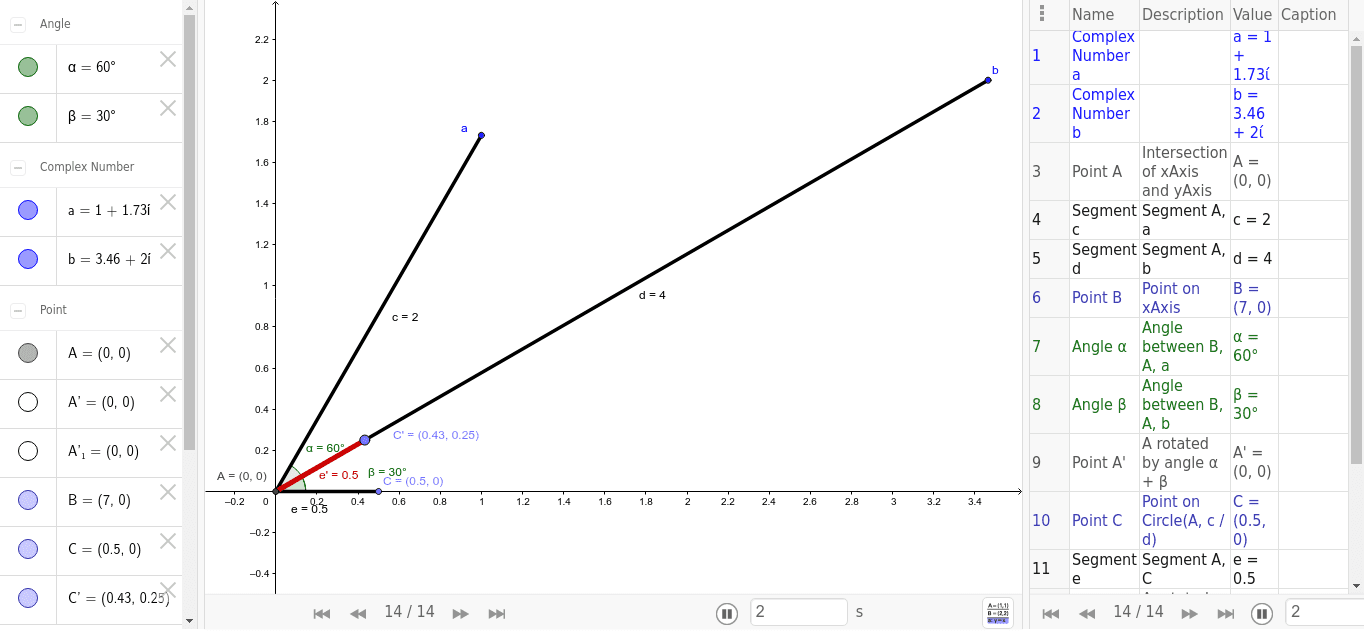
This example demonstrates how geometric shapes and probability distributions interact to understand mathematical concepts. Key mathematical concepts include triangle geometry, probability distributions, and geometric construction. Construction involves using GeoGebra commands such as Intersect, Segment, Point, Angle, and Rotate. Suitable for high school students or college students learning the integration of geometry and probability.
GeoGebra Commands & Parameters
Intersect(xAxis, yAxis) → ASegment(A, a) → cSegment(A, b) → dPoint(xAxis) → BAngle(B, A, a) → αAngle(B, A, b) → βRotate(A, α + β, A) → A'Point(Circle[A, c / d]) → CSegment(A, C) → eRotate(A, α - β, A) → A'_1Rotate(C, α - β, A) → C'Segment(A'_1, C') → e'
AI Drawing Prompt Reference
Draw a triangle ABC with AB and AC as two sides and BC as the base. Rotate point A to generate points A' and A'_1, and rotate point C to generate point C'. Construct angles α and β, which are angles BAC and ABC respectively. Use the sum and difference of angles α and β to rotate points and segments, and finally obtain segments e and e'.
The prompt above was compiled from the original drawing commands and is for reference only.