
GeoGebra Function Graph and Parameterization Example
Loading the math board and drawing, please wait…
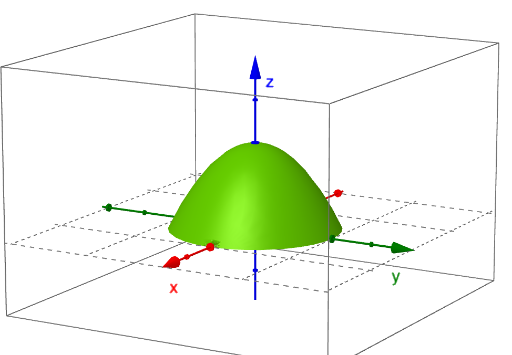
This example demonstrates constructing a 3D surface from parametric functions and labeling key points. Key mathematical concepts include function graphing, parametric equations, and 3D geometric transformations. Construction involves using commands like Surface, Textfield, Element, and setting coordinate ranges such as xmin, xmax, zmin. Suitable for high school students learning function transformations and 3D modeling in math courses.
GeoGebra Commands & Parameters
Surface(xmin, (u * ymin(xmin)) + ((1 - u) * ymax(xmin)), (v * zmin(xmin, (u * ymin(xmin)) + ((1 - u) * ymax(xmin)))) + ((1 - v) * zmax(xmin, (u * ymin(xmin)) + ((1 - u) * ymax(xmin)))), u, 0, 1, v, 0, 1) → leftSurface(xmax, (u * ymin(xmax)) + ((1 - u) * ymax(xmax)), (v * zmin(xmax, (u * ymin(xmax)) + ((1 - u) * ymax(xmax)))) + ((1 - v) * zmax(xmax, (u * ymin(xmax)) + ((1 - u) * ymax(xmax)))), u, 0, 1, v, 0, 1) → rightTextfield(xmin) → textfield1Textfield(xmax) → textfield2Textfield(ymin) → textfield3Textfield(ymax) → textfield4Textfield(zmin) → textfield5Textfield(zmax) → textfield6Surface((u / 3 * xmin) + ((1 - u / 3) * xmax), (v / 3 * ymax((u / 3 * xmin) + ((1 - u / 3) * xmax))) + ((1 - v / 3) * ymin((u / 3 * xmin) + ((1 - u / 3) * xmax))), zmax((u / 3 * xmin) + ((1 - u / 3) * xmax), (v / 3 * ymax((u / 3 * xmin) + ((1 - u / 3) * xmax))) + ((1 - v / 3) * ymin((u / 3 * xmin) + ((1 - u / 3) * xmax)))), u, 0, 3, v, 0, 3) → upSurface((u / 3 * xmin) + ((1 - u / 3) * xmax), (v / 3 * ymax((u / 3 * xmin) + ((1 - u / 3) * xmax))) + ((1 - v / 3) * ymin((u / 3 * xmin) + ((1 - u / 3) * xmax))), zmin((u / 3 * xmin) + ((1 - u / 3) * xmax), (v / 3 * ymax((u / 3 * xmin) + ((1 - u / 3) * xmax))) + ((1 - v / 3) * ymin((u / 3 * xmin) + ((1 - u / 3) * xmax)))), u, 0, 3, v, 0, 3) → downElement(vdir, faces) → Selectvec
AI Drawing Prompt Reference
Draw a 3D surface using parametric equations and label key points. The surface consists of two parts, left and right, defined with different parameter ranges. Add text labels to display the coordinates of key points such as xmin, xmax, ymin, ymax, zmin, zmax. Create transition surfaces above and below the main surface using parametric equations and different ranges. Finally, select a vector direction to connect key points and form geometric relationships.
The prompt above was compiled from the original drawing commands and is for reference only.