
GeoGebra Exercise Answer Feedback Template (Tick, Cross, and Smileys)
Loading the math board and drawing, please wait…
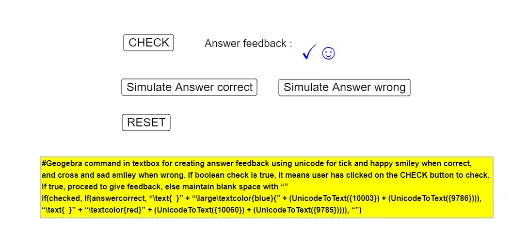
① This example demonstrates how to provide intuitive visual feedback for student answers in GeoGebra exercises, using checkmarks, crosses, and smiley faces to distinguish correct from incorrect responses. ② It covers core mathematical concepts such as conditional probability, coordinates, quadratic functions, frequency distribution, and hypothesis testing, all of which can be practiced with this feedback template. ③ Construction highlights: from the construction summary, multiple buttons (button1 to button4) and a checkbox (checked) are used to trigger feedback logic, a boolean object (answercorrect) determines answer correctness, and text objects (text1, text2, text3) display corresponding feedback messages, leveraging GeoGebra's interactive objects and scripting capabilities. ④ It is suitable for middle school to university mathematics teachers to create self-assessment or classroom exercises, helping students instantly understand their performance and improve learning efficiency, and can also serve as a customizable template for teachers to adapt questions and feedback content.
GeoGebra Commands & Parameters
Boolean checked(true)Boolean answercorrect(true)
AI Drawing Prompt Reference
Create an interactive math exercise feedback interface with a central question area, four buttons and a checkbox below for answer submission and state toggling. Based on correctness, display checkmarks, crosses, or smiley faces with corresponding text messages. Include a coordinate grid and function graph as background, with a slider for parameter adjustment. Visually distinguish correct and incorrect feedback using different colors.
The prompt above was compiled from the original drawing commands and is for reference only.