
Generating a Cylinder
Loading the math board and drawing, please wait…
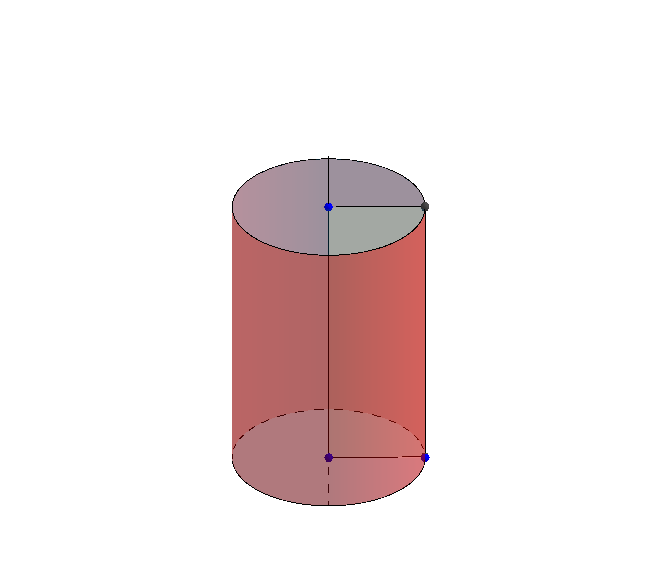
This example demonstrates how to generate a cylinder using GeoGebra. It involves the geometric construction and coordinate geometry of a cylinder. By using commands such as Point, Vector, Line, Polygon, and Surface, various components of the cylinder can be constructed. Suitable for middle school and above students or teachers.
GeoGebra Commands & Parameters
Point(zAxis) → BVector(O, O_1) → uLine(B, O) → fPolygon(O, E, F, O_1) → poly1, k, l, m, nSurface(cos(k°), (-sin(k°)), z, k, 0, t, z, z(O), z(B)) → cCurveCartesian(cos(k°), (-sin(k°)), z(B), k, 0, t) → dCurveCartesian(cos(k°), (-sin(k°)), z(O), k, 0, t) → gSurface((r * cos(k°)), ((-r) * sin(k°)), 0, k, 0, t, r, 0, 1) → hSurface((r * cos(k°)), ((-r) * sin(k°)), z(B), k, 0, t, r, 0, 1) → iRay(O, (0, 0, 1)) → j
AI Drawing Prompt Reference
Draw a cylinder, showing its geometric construction and coordinate geometry. Start by creating a line and a polygon as the base, then generate two surfaces for the side and top of the cylinder, followed by two curves outlining its shape, and finally add a ray to indicate the height direction.
The prompt above was compiled from the original drawing commands and is for reference only.