
General Region Double Integral: Top-Bottom and Left-Right Curves
Loading the math board and drawing, please wait…
In collections
Fun with Functions
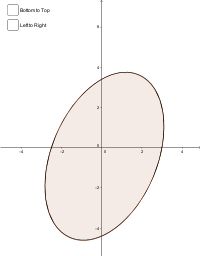
This GeoGebra example demonstrates how to define the integration region for a double integral using either top/bottom curves or left/right curves, with the integrated area shaded in both representations. The core mathematical concepts include double integrals, Type I and Type II region descriptions, area between curves, and Riemann sum foundations. The construction uses commands such as IntegralBetween to compute the integral between two curves, Vector, Midpoint, Point, OrthogonalLine, and Intersect to build auxiliary points and boundaries, and Polygon to create the region polygon. Objects like Bottom2Top and Left2Right allow switching between the two boundary representations. This is suitable for university-level calculus or multivariable calculus courses, helping students visualize how different integration orders correspond to different curve-based region definitions, and is ideal for classroom demonstrations or self-study.
GeoGebra Commands & Parameters
IntegralBetween(f_{top}, f_{bottom}, -2.8, Left2Right) → aVector(A, B) → uMidpoint(A, B) → CPoint(f_{top}) → DPoint(f_{bottom}) → EOrthogonalLine(F, yAxis) → fIntersect(g_{left}, f) → GIntersect(g_{right}, f) → H, H_1Vector(G, H) → vIntegralBetween(f_{bottom}, f_{top}, -2.8, 3.08) → bPolygon(I, K, L, J) → poly1, g, h, i, j
AI Drawing Prompt Reference
Draw a coordinate plane with two curves serving as top and bottom boundaries. Shade the region between them, and also represent the same region using left and right boundary curves. Add a vertical reference line and a horizontal reference line. Place points on the top and bottom curves, connect them with a vector, and mark the midpoint. Mark intersections of the left/right curves with the reference lines)Skip vectors. Outline the shaded region with a polygon and label the area between the curves.
The prompt above was compiled from the original drawing commands and is for reference only.