
G_8.04 Solving right triangles
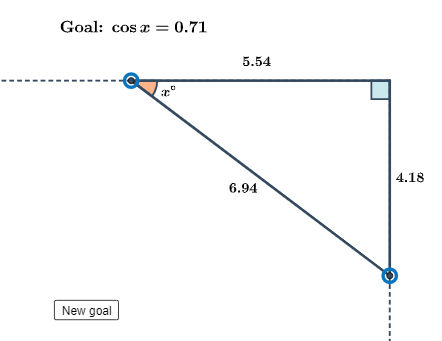
Loading the math board and drawing, please wait…
This example demonstrates constructing and solving right triangles using GeoGebra. Key mathematical concepts include trigonometry, angles, and geometric construction. Construction involves using commands like Ray, Point, Rotate, Segment, Angle, and Midpoint, along with tools like AngularBisector. Suitable for middle or high school mathematics to understand right triangle properties and trigonometric applications.
GeoGebra Commands & Parameters
Ray(B, A) → fPoint(f) → DRotate(A, 90°, B) → A'Ray(B, A') → gPoint(g) → ESegment(D, E) → hSegment(B, D) → iSegment(B, E) → jAngle(B, D, E) → βMidpoint(D, E) → FMidpoint(i) → GMidpoint(j) → HAngle(D, B, E) → γAngularBisector(h, i) → k, lCircle(D, 0.6) → cIntersect(c, l) → I, JAngle(B, D, E) → δIf(round(β, 1) ≟ a°, 1, 0) → b1Circle(F, 0.8) → dCircle(G, 0.8) → eCircle(H, 0.5) → pPoint(d) → MPoint(e) → NPoint(p) → OText(text3, O, true, true, 0, 0) → text9Text(text2, N, true, true, 0, -1) → text8Text(text4, M, true, true, 1, 1) → text7Point(c) → PPoint(d) → QShuffle({0, 1, 2}) → trigFxn, {1, 0, 2}Point(c) → RAngle(D, B, E) → αPoint(k) → TIf(Show ≟ true, If[IsInRegion[Q, e], Text[text5, T, true, true, 0, 0], Text[text5, J, true, true, 1, 0]], If[IsInRegion[Q, e], Text[text12, T, true, true, 0, 0], Text[text12, J, true, true, 1, 0]]) → text10If(IsInRegion[T, e], If[Show ≟ true, Text[text5, T, true, true, 0, 0], Text[text10, T, true, true, 0, 0]]) → text11
AI Drawing Prompt Reference
Draw a right triangle with point B as the right angle vertex, and points A and A' as the endpoints of the legs. Construct the sides and angles of the right triangle using lines, angles, and midpoints. Use angle bisectors and circles to create auxiliary lines and circles, label the angles, and display the triangle's properties.
The prompt above was compiled from the original drawing commands and is for reference only.