
Function Domain and Range
Loading the math board and drawing, please wait…
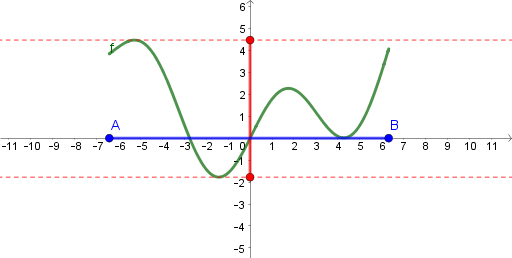
This example demonstrates how to use GeoGebra to plot function graphs and dynamically show their domain and range. Key math concepts include functions, domain, range, and coordinate geometry. Construction highlights involve commands like Point, Join, Min, Max, Segment, OrthogonalLine to create geometric objects and calculate min/max values. Suitable for high school mathematics teaching to help students visually understand function graphs and their key features.
GeoGebra Commands & Parameters
Point(xAxis) → APoint(xAxis) → BJoin({{(x(A), f(x(A))), (x(B), f(x(B)))}, {Extremum[f, x(A), x(B)]}}) → l1Min(l2) → aMax(l2) → bSegment(D, C) → gOrthogonalLine(D, g) → hOrthogonalLine(C, g) → iSegment(A, B) → j
AI Drawing Prompt Reference
In a coordinate plane, choose two points on the x-axis to serve as the left and right reference positions for a function graph. At these x-values, place the corresponding function points and form a function curve using the two points together with the extremum information over the interval. From the curve, determine the minimum and maximum values and use them to define a baseline segment. Through the extremum points, draw two perpendicular lines to this baseline, establishing the perpendicular structure. Finally, connect the two originally chosen x-axis reference points with a segment, so the diagram highlights the key features related to the function’s domain and range.
The prompt above was compiled from the original drawing commands and is for reference only.