
Frieze Group P2 Construction
Loading the math board and drawing, please wait…
In collections
Playing With Symmetry
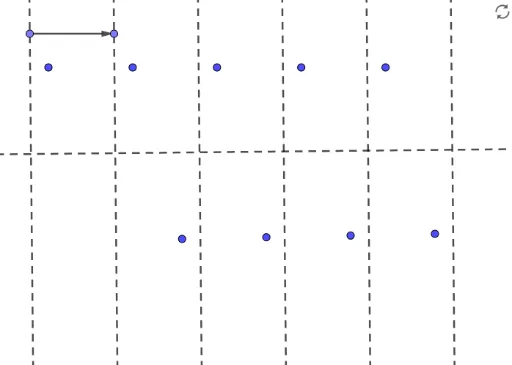
This example demonstrates the geometric construction of Frieze Group P2, showcasing symmetry operations like translation, reflection, and rotation. Key math concepts include symmetry transformations, translations, reflections, rotations. It utilizes GeoGebra commands such as Line, Point, OrthogonalLine, Mirror, Vector, Translate, Intersect, Rotate. Suitable for high school and above students learning about the connection between group theory and geometric transformations.
GeoGebra Commands & Parameters
Line(A, B) → fPoint(f) → COrthogonalLine(C, f) → gPoint(g) → DOrthogonalLine(D, g) → hMirror(f, h) → f'Mirror(h, f') → h'Mirror(f', h') → f''Mirror(h, f) → h'_1Point(h'_1) → FPoint(f) → GVector(F, G) → uTranslate(E, u) → E'Translate(E', u) → E''Translate(E'', u) → E'''Translate(E''', u) → HIntersect(f, g) → IIntersect(g, h) → JIntersect(g, f') → KIntersect(g, h') → LRotate(E, 180°, I) → E'_1Rotate(E', 180°, J) → E''_1Rotate(E'', 180°, K) → E'''_1Rotate(E''', 180°, L) → M
AI Drawing Prompt Reference
Draw a geometric construction demonstrating Frieze Group P2 symmetry, featuring a horizontal line segment and two perpendicular vertical line segments. Start by identifying the intersection points between the horizontal and vertical segments. Then, create symmetric copies of the horizontal line segment using mirror operations across the vertical segments. Next, use the vector formed by the endpoints of the horizontal segment to translate multiple copies along its direction. Finally, perform 180-degree rotations around the intersection points to showcase the symmetry transformations of Frieze Group P2.
The prompt above was compiled from the original drawing commands and is for reference only.