
Fractions and Equivalent Fractions
Loading the math board and drawing, please wait…
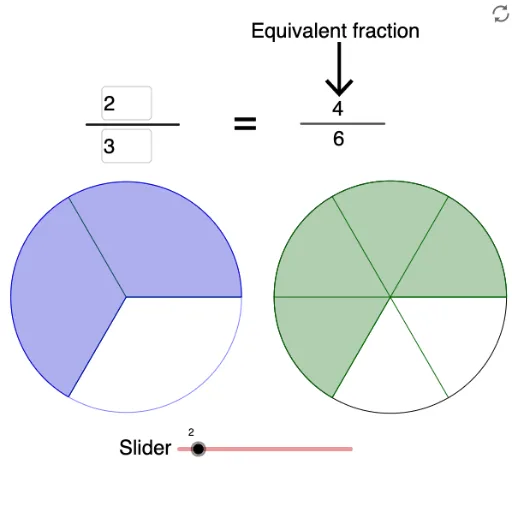
This example demonstrates the geometric representation and calculation of fractions and their equivalent fractions. It involves core mathematical concepts such as the fundamental properties of fractions, criteria for equivalent fractions, and geometric construction. Key GeoGebra commands and objects used include Point, Circle, Sequence, Sector, Textfield, Segment, and AttachCopyToView for visualizing and interactively manipulating fractions. Suitable for middle school and above mathematics education, aiding in the intuitive understanding of fraction concepts and exploration of equivalent fractions.
GeoGebra Commands & Parameters
Point(xAxis) → CPoint(xAxis) → DCircle(C, D) → ePoint(xAxis) → EPoint(xAxis) → FCircle(E, F) → fSequence(Rotate[D, (360° * i / D1), C], i, 1, D1) → list1Sequence(Segment[C, Element[list1, i]], i, 1, D1 + 1) → list2Sector(e, D, Element[list1, N1]) → gSequence(Rotate[F, (360° * i / b), E], i, 1, b) → list3Sequence(Segment[E, Element[list3, i]], i, 1, b) → list4Circle(E, 1.3) → kSector(f, F, Element[list3, New]) → hTextfield(D1) → InputBox1Textfield(N1) → InputBox2Textfield(Mul) → InputBox3Segment(Q, R) → jSegment(Q, R) → lSegment(S, T) → mAttachCopyToView(PolyLine[(12.2205876488494, -5.88921046287111), (NaN, NaN), (12.2205876488494, -5.88921046287111), true], 1, (-3.6253531256903755, -5.8892104628711035), (8.613381618872829, 4.292598364169786), (0, 948), (1140, 0)) → stroke1