
Fraction Sum Demonstration with GeoGebra
Loading the math board and drawing, please wait…
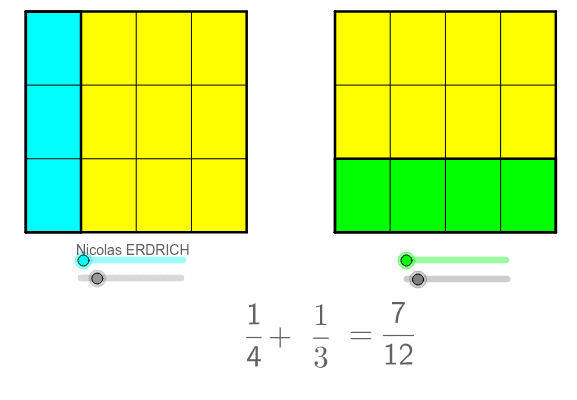
This example dynamically demonstrates the geometric representation of fraction sums using GeoGebra. It involves core math concepts like fractions, multiplication, angles, means, orthocenter, and terms. Construction highlights include commands like Line, Circle, Intersect, OrthogonalLine, Polygon, Sequence, GCD, Vector, Translate, If, and Text. Suitable for high school mathematics education to understand the connection between fraction operations and geometric figures.
GeoGebra Commands & Parameters
Line(A, xAxis) → a_2Circle(A, 5) → c_2Intersect(c_2, a_2) → B_1, BCircle(B, 2) → d_3Intersect(d_3, a_2, 2) → ECircle(E, 5) → eIntersect(e, a_2, 2) → FCircle(F, 2) → fIntersect(f, a_2, 2) → ICircle(I, 5) → gIntersect(g, a_2, 2) → JOrthogonalLine(A, xAxis) → b_1Intersect(c_2, b_1, 2) → DOrthogonalLine(J, a_2) → hOrthogonalLine(D, b_1) → iIntersect(h, i) → KOrthogonalLine(B, i) → jOrthogonalLine(E, i) → kOrthogonalLine(F, i) → lOrthogonalLine(I, i) → mIntersect(i, j) → CIntersect(l, i) → GIntersect(m, i) → LIntersect(k, i) → HPolygon(A, D, C, B) → poly1, a_1, h_1, j_1, c_1Polygon(E, F, G, H) → poly2, d_1, e_1, k_1, m_1Sequence(A + k * (B - A) / b, k, 0, b) → liste1Sequence(D + k * (C - D) / b, k, 0, b) → liste2Sequence(Segment[Element[liste1, k], Element[liste2, k]], k, 0, b) → liste3Polygon(A, Element[liste1, a + 1], Element[liste2, a + 1], D) → poly4, a_3, n, p, d_2Sequence(E + (H - E) * k / d, k, 0, d) → liste4Sequence(F + (G - F) * k / d, k, 0, d) → liste5Sequence(Segment[Element[liste4, k], Element[liste5, k]], k, 0, d) → liste6Polygon(E, Element[liste4, c + 1], Element[liste5, c + 1], F) → poly5, e_2, q, r, f_2Sequence(I + (J - I) * k / b, k, 0, b) → liste7Sequence(L + (K - L) * k / b, k, 0, b) → liste8Sequence(I + (L - I) * k / d, k, 0, d) → liste9Sequence(J + (K - J) * k / d, k, 0, d) → liste10Sequence(A + (D - A) * k / d, k, 0, d) → liste13Sequence(B + (C - B) * k / d, k, 0, d) → liste14Sequence(Segment[Element[liste13, k], Element[liste14, k]], k, 0, d) → liste15Sequence(E + (F - E) * k / b, k, 0, b) → liste16Sequence(H + (G - H) * k / b, k, 0, b) → liste17Sequence(Segment[Element[liste16, k], Element[liste17, k]], k, 0, b) → liste18GCD(val1, val2) → val3Polygon(I, J, K, L) → poly3, i_1, j_2, k_2, l_1Vector(E, I) → uTranslate(liste6, u) → liste6'Translate(liste18, u) → liste18'Vector(A, I) → vTranslate(I, v) → I'Translate(J, v) → J'Translate(K, v) → K'Translate(L, v) → L'If(floor(val1 / val2) ≟ val1 / val2, val1 / val2, false) → val5Text("=" + val5) → texte3
AI Drawing Prompt Reference
Draw a dynamic geometric representation of fraction sums. Start by drawing a horizontal line and a circle, creating intersection points to form a triangle. Construct multiple circles and intersections to generate smaller triangles and quadrilaterals. Use vectors to connect key points and draw segments and polygons, illustrating the geometric meaning of fraction sums. Finally, translate some shapes along vectors to create a dynamic effect, visually demonstrating the geometric construction of fraction sums.
The prompt above was compiled from the original drawing commands and is for reference only.