
Fraction Shapes Demo
Loading the math board and drawing, please wait…
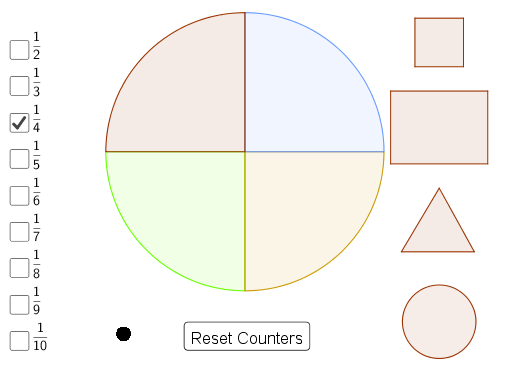
This example demonstrates how to divide various shapes (like cuboids, isosceles triangles) into parts to visualize fractions. It involves core math concepts such as fractions, natural numbers, polygon construction, and polynomial functions. GeoGebra commands like Polygon, Sequence, Circle, Point, and Sector are used to construct the shapes and visualize the fractions. Suitable for elementary and middle school math education for fraction introduction and geometric intuition.
GeoGebra Commands & Parameters
Polygon((B1, 0), (B2, 0), (B2, 1 / shape), (B1, 1 / shape)) → C1, D1, E1, F1, G1Polygon((B2, 0), (B3, 0), (B3, 1 / shape), (B2, 1 / shape)) → C2, D2, E2, F2, G2Polygon((B3, 0), (B4, 0), (B4, 1 / shape), (B3, 1 / shape)) → C3, D3, E3, F3, G3Polygon((B4, 0), (B5, 0), (B5, 1 / shape), (B4, 1 / shape)) → C4, D4, E4, F4, G4Polygon((B5, 0), (B6, 0), (B6, 1 / shape), (B5, 1 / shape)) → C5, D5, E5, F5, G5Polygon((B6, 0), (B7, 0), (B7, 1 / shape), (B6, 1 / shape)) → C6, D6, E6, F6, G6Polygon((B7, 0), (B8, 0), (B8, 1 / shape), (B7, 1 / shape)) → C7, D7, E7, F7, G7Polygon((B8, 0), (B9, 0), (B9, 1 / shape), (B8, 1 / shape)) → C8, D8, E8, F8, G8Polygon((B9, 0), (B10, 0), (B10, 1 / shape), (B9, 1 / shape)) → C9, D9, E9, F9, G9Polygon((B10, 0), (B11, 0), (B11, 1 / shape), (B10, 1 / shape)) → C10, D10, E10, F10, G10Sequence("SetValue[H" + (i) + "," + (If[i + 1 ≟ newDenom, true, false]) + "]", i, 1, 10) → list4Sequence("SetCoords[I" + (i) + ",0,-0.25]", i, 1, 100) → list5Polygon(A, B, C, D) → poly1, a, b, c, dPolygon(E, F, G, H) → poly2, e, f, g, hPolygon(I, J, K) → poly3, k_1, i, jCircle(L, M) → pPolygon(N, P, R) → poly4, r, n, p_1Polygon(O, R, P) → poly5, p_2, o, r_1Polygon(Q, P, N) → poly6, n_1, q, p_3Polygon(N, Q, O) → poly7, o_1, n_2, q_1Polygon(P, O, Q) → poly8, q_2, p_4, o_2Circle(S, T) → kPoint(k, A1 / denominator) → J1Point(k, A2 / denominator) → J2Point(k, A3 / denominator) → J3Point(k, A4 / denominator) → J4Point(k, A5 / denominator) → J5Point(k, A6 / denominator) → J6Point(k, A7 / denominator) → J7Point(k, A8 / denominator) → J8Point(k, A9 / denominator) → J9Point(k, A10 / denominator) → J10Point(k, A11 / denominator) → J11Sector(k, J1, J2) → K1Sector(k, J2, J3) → K2Sector(k, J3, J4) → K3Sector(k, J4, J5) → K4Sector(k, J5, J6) → K5Sector(k, J6, J7) → K6Sector(k, J7, J8) → K7Sector(k, J8, J9) → K8Sector(k, J9, J10) → K9Sector(k, J10, J11) → K10