
Fraction Multiplication Demo by Azimah Shahirah
Loading the math board and drawing, please wait…
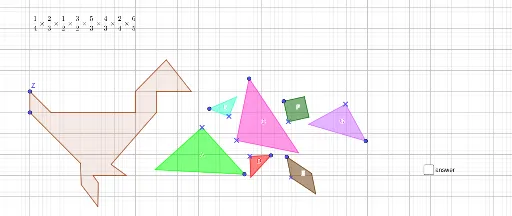
This example demonstrates the geometric interpretation of fraction multiplication through dynamic visuals, illustrating the relationship between the product of fractions and the area of shapes. It involves core concepts like fraction operations, area calculation, coordinate geometry, and polygon construction. GeoGebra commands such as Point and Polygon are used to parametrically build shapes and calculate varying areas, making it suitable for middle school and above mathematics education to enhance spatial reasoning and connect fractions with geometric concepts.
GeoGebra Commands & Parameters
Point(Circle[A_2, 3]) → B_2Polygon(A_2, B_2, C_2) → C, c, a, bPoint(Circle[D_2, 3]) → E_2Polygon(D_2, E_2, F_2) → A, f, d, ePoint(Circle[G_2, 2]) → HPolygon(G_2, H, I) → G, i, g, hPoint(Circle[J, 1]) → KPolygon(J, K, L) → B, l, j, kPoint(Circle[M, 1]) → NPolygon(M, N, O) → D, o, m, nPoint(Circle[P, 1]) → QPolygon(P, Q, R, S) → F, p, q, r, sPoint(Circle[T, 1]) → UPolygon(T, U, V, W) → E, t, u, v, wPoint(Circle[Z, 1]) → A_1Polygon(Z, A_1, J_1, K_1, L_1, M_1, N_1, O_1, B_1, C_1, D_1, E_1, F_1, G_1, H_1, I_1) → poly1, z_1, i_1, j_1, k_1, l_1, m_1, n_1, o_1, a_1, b_1, c_1, d_1, e_1, f_1, g_1, h_1
AI Drawing Prompt Reference
Create a dynamic visualization demonstrating the geometric interpretation of fraction multiplication. Construct several circles and generate corresponding regular polygons using points on the circles as vertices. The size and number of polygons vary to illustrate the concept of fraction multiplication, with the overall image showing the relationship between the product of fractions and the area of shapes.
The prompt above was compiled from the original drawing commands and is for reference only.