
Geometric Shapes and Area Calculation: Exploring Shape and Area with Tanram
Loading the math board and drawing, please wait…
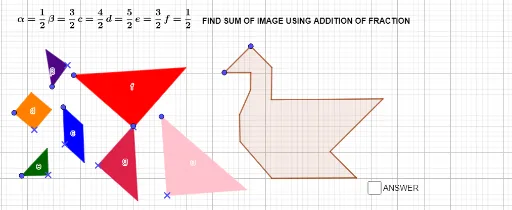
This example demonstrates how to complete geometric shapes using tanram and calculate their areas. Key mathematical concepts include area calculation, geometric shape recognition, and spatial reasoning. Construction involves using GeoGebra commands like Point and Polygon, and slider animations to observe area changes. Suitable for middle school students to understand practical applications of geometry and area.
GeoGebra Commands & Parameters
Point(Circle[C, 3]) → DPolygon(C, D, E) → f, e_1, c_1, d_1Point(Circle[F, 3]) → GPolygon(F, G, H) → α, h, f_1, g_1Point(Circle[I, 2]) → JPolygon(I, J, K) → g, k, i, jPoint(Circle[L, 1]) → MPolygon(L, M, N) → t4, n, l, ePoint(Circle[O, 1]) → PPolygon(O, P, Q) → t5, q, o, βPoint(Circle[R, 1]) → SPolygon(R, S, T, U) → d, r, s, t, uPoint(Circle[V, 1.4142135623730951]) → WPolygon(V, W, Z, A_1) → c, v, w, z_1, a_1Point(Circle[A, 1.4142135623730951]) → BPolygon(A, B, L_1, M_1, D_1, E_1, F_1, G_1, H_1, I_1, J_1, K_1) → poly1, a_2, k_1, l_1, m_1, b, d_2, e_2, f_2, g_2, h_1, i_1, j_1
AI Drawing Prompt Reference
Create a geometric puzzle composition with multiple shapes, including several triangles and a large polygon. Start by placing points on circles of different radii (3, 3, 2, 1, 1, 1) and connecting them to form triangles. Then, use circles of radius 1.414 to form a quadrilateral and a twelve-sided polygon. Arrange all shapes independently but in a tanram-like layout. Finally, overlay a large twelve-sided polygon to encompass the other shapes, completing the puzzle. The drawing should illustrate area calculation and shape recognition for educational purposes.
The prompt above was compiled from the original drawing commands and is for reference only.