
Fraction Multiplication by Trivikrama M
Loading the math board and drawing, please wait…
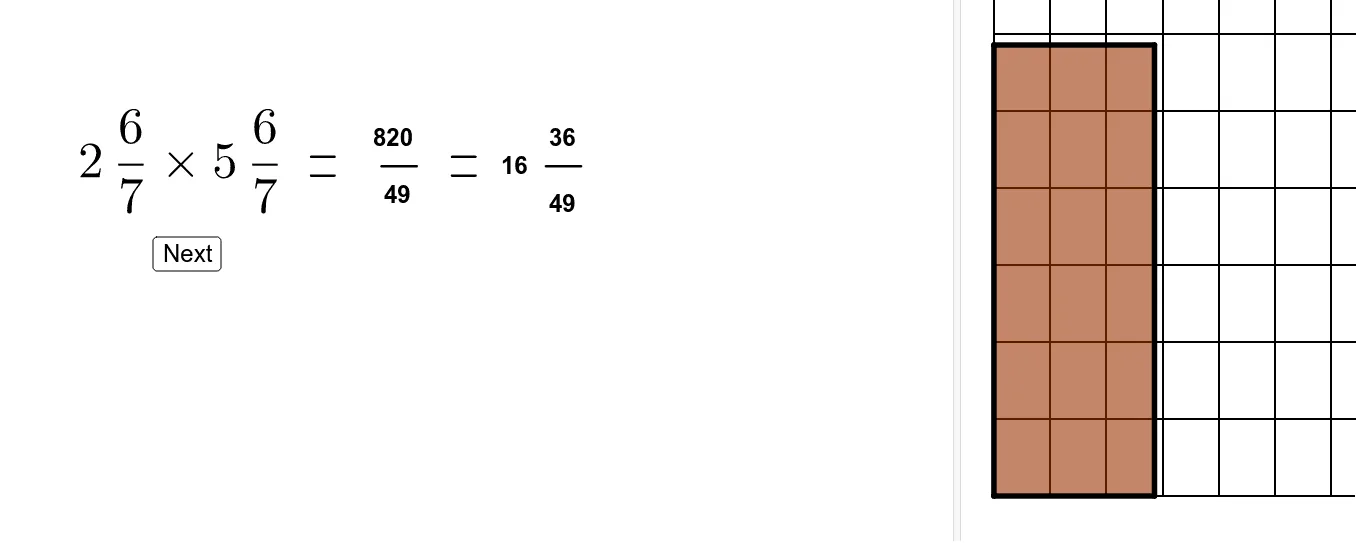
This example demonstrates the geometric intuition and calculation process of fraction multiplication. It involves core mathematical concepts such as fraction multiplication rules, geometric construction, symmetry, and geometric transformations. GeoGebra commands and objects like Textfield, Point, Intersect, Segment, Polygon, Flatten, First, If, Sequence, Remove, Sort, Take, Max, Mod, Div are used in the construction. Suitable for middle school and above mathematics education, aiding in understanding fraction operations and their geometric relationships.
GeoGebra Commands & Parameters
Textfield(w1T) → InputBox1Textfield(n1T) → InputBox2Textfield(d1T) → InputBox3Textfield(w2T) → InputBox4Textfield(d2T) → InputBox6Textfield(n2T) → InputBox5Point({(f1 * grow), 0}) → APoint({0, (f2 * grow)}) → BIntersect(xAxis, yAxis) → CSegment(C, A) → fSegment(C, B) → gPoint({f1, (grow2 * f2)}) → DPoint({(f1 * grow2), f2}) → ESegment(A, D) → hSegment(B, E) → iPolygon(C, (floor(f1), 0), (floor(f1), floor(f2)), (0, floor(f2))) → poly1, c, j, k, lFlatten(Sequence[Sequence[Point[{i, j}], i, w1 + (n1 - 1) / d1, 0, -1 / d1], j, w2, w2 + (n2 - 1) / d2, 1 / d2]) → topAndCornerPolygon((w1, 0), (f1, 0), (f1, f2), (0, f2), (0, w2), (w1, w2)) → poly2, m, n, p, q, r, sPolygon((0, 0), (f1, 0), (f1, f2), (0, f2)) → poly3, t, d, e, f_1Polygon((w1, 0), (f1, 0), (f1, w2), (w1, w2)) → poly4, g_1, h_1, i_1, j_1Polygon((0, w2), (f1, w2), (f1, f2), (0, f2)) → poly5, a, k_1, l_1, m_1First(Flatten[Sequence[Sequence[Polygon[(i, j), (i + 1, j), 4], j, 0, w2 - 1], i, w1, w1 + ceil(newOnes / w2)]], newOnes) → newWholesInBrownIf(w2T ≟ "", "0", w2T) → w2BTIf(w1T ≟ "", "0", w1T) → w1BTIf(n1T ≟ "", "0", n1T) → n1BTIf(n2T ≟ "", "0", n2T) → n2BTIf(d1T ≟ "", "1", d1T) → d1BTIf(d2T ≟ "", "1", d2T) → d2BTSequence(Sequence[Point[{i, j}], i, w1, f1 - 1 / d1, 1 / d1], j, 0, w2 - 1 / d2, 1 / d2) → rightFlatten(Join[{right, topAndCorner}]) → origFractionPointsFirst(Flatten[Sequence[Sequence[Sequence[Sequence[Point[{i + k, j + m}], i, 0, 1 - 1 / d1, 1 / d1], j, 0, 1 - 1 / d2, 1 / d2], m, 0, w2 - 1], k, w1, w1 + ceil(newOnes / w2)]], Length[origFractionPoints]) → destinationFractionPointsRemove(origFractionPoints, destinationFractionPoints) → thesePointsWillMoveSort(Remove[destinationFractionPoints, origFractionPoints]) → movingTargetsFirst(Flatten[Sequence[Sequence[Polygon[(i, j), (i + 1, j), 4], j, 0, Max[0, w2 - 1]], i, w1, w1 + newOnes]], newOnes) → newWholesInGreenSort(Remove[Unique[Flatten[Join[{right, destinationFractionPoints}]]], thesePointsWillMove]) → finalRightSequence(y(Element[finalRight, i]), i, 1, Length[finalRight]) → finalYvaluesSort(finalRight, finalYvalues) → sortedFinalRightTake(destinationFractionPoints, ((newOnes * d1) * d2) + 1, Length[destinationFractionPoints]) → leftoverFractionPointsPolygon((w1, 0), (f1, 0), (f1, Min[w2, newOnes]), (w1, Min[w2, newOnes])) → poly6, b, n_1, p_1, q_1Sequence(Polygon[Element[leftoverFractionPoints, i], Element[leftoverFractionPoints, i] + (1 / d1, 0), Element[leftoverFractionPoints, i] + (1 / d1, 1 / d2), Element[leftoverFractionPoints, i] + (0, 1 / d2)], i, 1, Length[leftoverFractionPoints]) → leftoverFractionPolysSequence((Element[thesePointsWillMove, i] * (1 - partMover)) + (Element[movingTargets, i] * partMover), i, 1, Length[movingTargets]) → movingPointsSequence(Polygon[Element[movingPoints, i], Element[movingPoints, i] + (1 / d1, 0), Element[movingPoints, i] + (1 / d1, 1 / d2), Element[movingPoints, i] + (0, 1 / d2)], i, 1, Length[movingPoints]) → movingPolysRemove(leftoverFractionPoints, movingTargets) → addthesePointsSequence(Polygon[Element[addthesePoints, i], Element[addthesePoints, i] + (1 / d1, 0), Element[addthesePoints, i] + (1 / d1, 1 / d2), Element[addthesePoints, i] + (0, 1 / d2)], i, 1, Length[addthesePoints]) → addThesePolysPoint(yAxis) → GSegment(F, G) → r_1Segment(H, I) → s_1Max({f2, 2, f1 + If[w2 > 0, ceil(newOnes / w2), newOnes]}) → scaleSequence(Sequence[Polygon[Element[leftoverFractionPoints, 1] + (i, j), Element[leftoverFractionPoints, 2] + (i, j), Element[leftoverFractionPoints, d1 + 2] + (i, j), Element[leftoverFractionPoints, d1 + 1] + (i, j)], i, 0, 1 - 1 / d1, 1 / d1], j, 0, 1 - 1 / d2, 1 / d2) → leftoveroutlinesMod(β, γ) → δDiv(β, γ) → ηSegment(J, K) → a_1Segment(L, M) → b_1Segment(N, O) → c_1Segment(P, Q) → d_1Segment(R, S) → e_1Segment(T, U) → t_1
AI Drawing Prompt Reference
Create a geometric illustration demonstrating the concept of fraction multiplication, featuring two fraction input sliders. Use coordinate axes and geometric constructions to show the geometric interpretation of fraction multiplication. Draw rectangles and triangles to represent the fractions, and move or transform these shapes to visually illustrate the calculation process and result of fraction multiplication.
The prompt above was compiled from the original drawing commands and is for reference only.