
Fraction Estimation
Loading the math board and drawing, please wait…
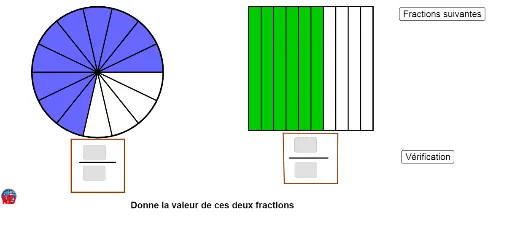
This example demonstrates how to estimate fractions using pie charts and geometric methods. It involves core math concepts like fractions, centroid, pie charts, fractal geometry, real numbers, and confidence intervals. Constructed with GeoGebra commands like Random, Sequence, Rotate, CircleSector, Circle, Segment, Polygon, Point, and Textfield. Suitable for middle school and above, focusing on fraction estimation and geometric constructions.
GeoGebra Commands & Parameters
Random(2, 15) → Denom2Random(2, 15) → denomRandom(1, denom - 1) → numSequence(Rotate[B, ((i * 360) * ° / denom), A], i, 1, denom) → liste1Sequence(Segment[A, Element[liste1, i]], i, 1, denom) → liste3Rotate(B, ((num * 360) * ° / denom), A) → B'_1CircleSector(A, B, B'_1) → dCircle(A, B) → eCircle(A, B) → cSequence(Segment[A, Element[liste1, i]], i, 1, denom) → liste2Circle(A, B) → hSegment(E, F) → iRandom(1, Denom2 - 1) → Num1Segment(G, H) → jPolygon(G, H, 4) → poly1, a, f, k, l, C, DSequence(G + ((i * a / Denom2), 0), i, 0, Denom2) → liste4Sequence(D + ((i * a / Denom2), 0), i, 0, Denom2) → liste5Sequence(Segment[Element[liste4, i], Element[liste5, i]], i, 1, Length[liste4]) → liste6Point(l) → KPolygon(D, J, I, K) → poly2, d_1, j_1, i_1, k_1Textfield(n1) → ChampTexte1Textfield(d1) → ChampTexte2Textfield(n2) → ChampTexte3Textfield(d2) → ChampTexte4Segment(L, M) → mPolygon(N, O, P, Q) → poly3, n_1, o, p, qPolygon(R, S, T, U) → poly4, r, s, t, u
AI Drawing Prompt Reference
Create a geometric illustration for fraction estimation using pie charts. Draw a circle and divide it into several sectors, each representing a fraction. Highlight one sector randomly to show the estimated fraction. Additionally, construct a geometric figure with multiple quadrilaterals to demonstrate the approximate value of the fraction. Include text labels indicating the numerical value of the fractions and the names of the geometric shapes.
The prompt above was compiled from the original drawing commands and is for reference only.