
Fraction Division Model
Loading the math board and drawing, please wait…
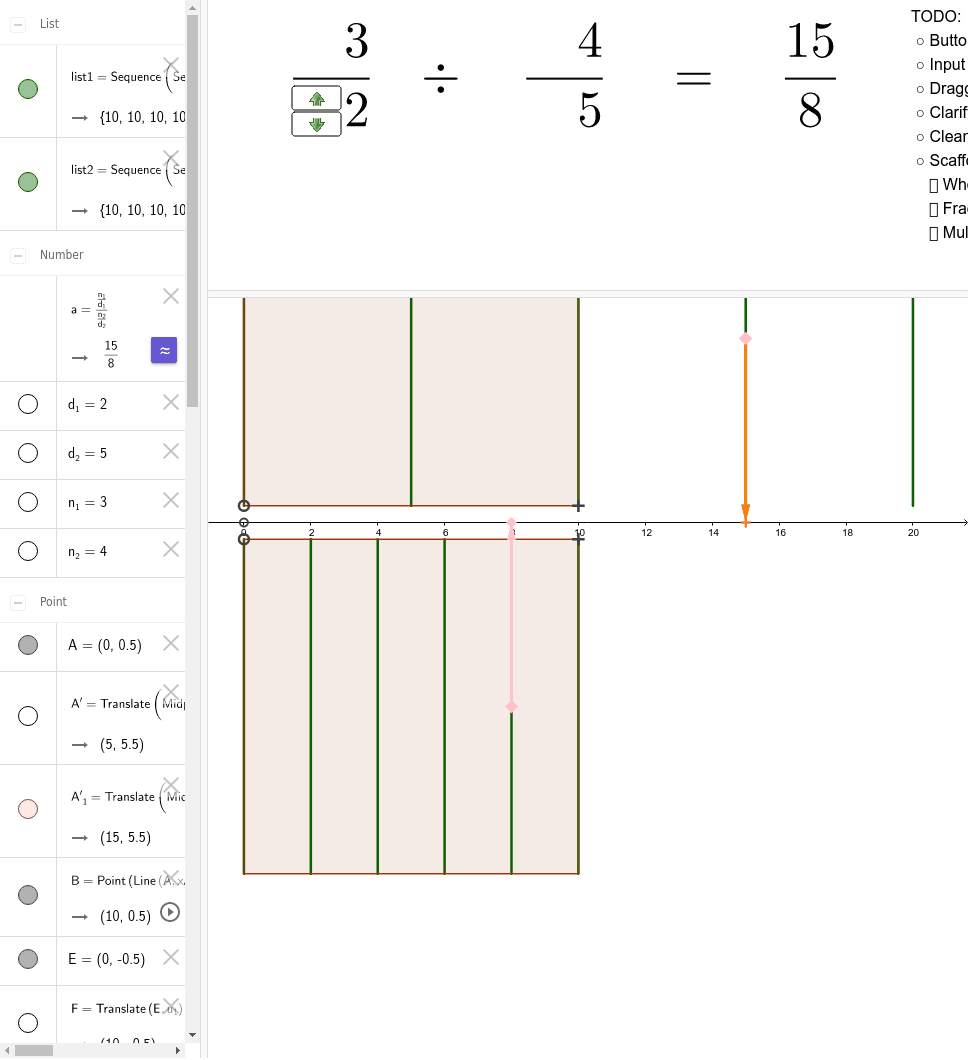
This example visually aids in understanding the concept of fraction division. It involves key mathematical concepts such as fractions and division. Using GeoGebra commands like Point, Vector, Polygon, Translate, Sequence, Midpoint, it dynamically illustrates the process of fraction division. Suitable for high-grade elementary or junior high school students.
GeoGebra Commands & Parameters
Point(Line[A, xAxis]) → BVector(A, B) → u_1Polygon(A, B, 4) → poly1, f, g, h, i, C, DTranslate(Midpoint[A, D], Vector[(n_1 / d_1 * u_1)]) → A'_1Translate(Midpoint[A, D], Vector[(1 / d_1 * u_1)]) → A'Sequence(Segment[Translate[D, Vector[(k / d_1 * u_1)]], Translate[A, Vector[(k / d_1 * u_1)]]], k, 0, (d_1 * ceil(n_1 / d_1))) → list1Translate(E, u_1) → FVector(E, F) → u_2Polygon(F, E, 4) → poly2, j, k, l, m, G, HTranslate(Midpoint[E, G], Vector[(1 / d_2 * u_2)]) → ITranslate(Midpoint[E, G], Vector[(n_2 / d_2 * u_2)]) → JMidpoint(A, E) → KTranslate(K, Vector[(n_1 / d_1 * u_1)]) → K'_1Translate(K, Vector[(n_2 / d_2 * u_2)]) → K'Vector(J, K') → uVector(A'_1, K'_1) → vDynamicCoordinates(B, x(F), y(F)) → LSequence(Segment[Translate[E, Vector[(k / d_2 * u_2)]], Translate[G, Vector[(k / d_2 * u_2)]]], k, 0, (d_2 * ceil(n_2 / d_2))) → list2
AI Drawing Prompt Reference
Draw a fraction division model with two line segments AB and EF, and their midpoints. Use translation and scaling to illustrate the process of fraction division. First, draw line segment AB, then draw line segment EF, and find the midpoints of AB and EF. Use these midpoints for translation and scaling to show the specific steps of fraction division.
The prompt above was compiled from the original drawing commands and is for reference only.