
Fraction Comparison by Daniel Mentrard
Loading the math board and drawing, please wait…
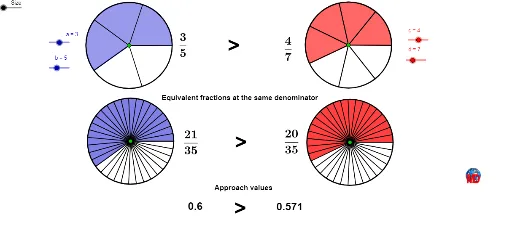
This example demonstrates how to visually compare fractions using graphical methods. It involves core mathematical concepts such as fractions, 2D vectors, real numbers, piecewise functions, normal distribution, and parabolas. Key GeoGebra commands used in construction include Circle, Point, Segment, Append, CircleSector, Zip, LCM, Sequence, Vector, Translate, Rotate, Mirror, Text, and Midpoint. It is suitable for high school mathematics education, helping students understand the geometric meaning of fraction comparison and vector applications.
GeoGebra Commands & Parameters
Circle(A, Size) → c_1Point(c_1) → BSegment(A, B) → a_1Append(Sequence[Rotate[B, i, A], i, (360 / b)°, 359.9°, (360 / b)°], Rotate[B, 359.99°, A]) → ListPCircleSector(A, B, Element[ListP, a]) → ShadeCircle(C, Size) → d_1Point(d_1) → DAppend(Sequence[Rotate[D, s, C], s, (360 / d)°, 359.9°, (360 / d)°], Rotate[D, 359.99°, C]) → ListP2CircleSector(C, D, Element[ListP2, c]) → Shade2Segment(C, D) → b_1Zip(Segment[C, W], W, ListP2) → ListS2Zip(Segment[A, Z], Z, ListP) → ListSLCM(b, d) → mmSequence(Rotate[F, i, E], i, 0, 6.283185307179586, (2 * π / mm)) → liste1Circle(E, F) → eVector(A, E) → uVector(E, G) → vSequence(Segment[E, Element[liste1, i]], i, 1, Length[liste1]) → liste2Vector(C, G) → wTranslate(e, v) → e'Translate(liste2, v) → liste2'Rotate(F, ((aa * 2) * π / mm), E) → AACircleSector(E, F, AA) → fTranslate(F, v) → F'Rotate(F', ((bb * 2) * π / mm), G) → BBCircleSector(G, F', BB) → gMirror(D, C) → D'Mirror(F', G) → F''Text(If[aa ≟ bb, "=", If[aa > bb, ">", "<"]]) → texte6Text(If[aa ≟ bb, "=", If[aa > bb, ">", "<"]]) → texte7Midpoint(A, C) → HMidpoint(E, G) → IText(If[aa ≟ bb, "=", If[aa > bb, ">", "<"]]) → texte9
AI Drawing Prompt Reference
Create a visual comparison of two fractions using circles, sectors, and vectors. Draw two circles of different sizes and fill sectors within each circle, where the angles represent the values of the fractions. Then, create vectors and use them to generate a series of rotating line segments. Finally, compare the relative positions of these segments to visually demonstrate the relationship between the two fractions, and label the comparison with symbols.
The prompt above was compiled from the original drawing commands and is for reference only.