
Fraction Bar Addition Model
Loading the math board and drawing, please wait…
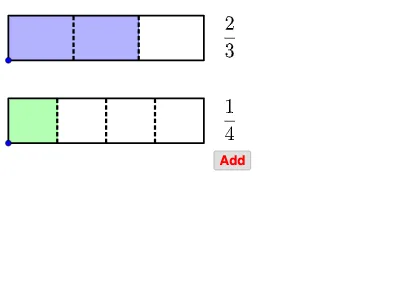
This example demonstrates the geometric model of adding fractions with the same denominator. Key mathematical concepts include fraction addition. Construction highlights the use of points, rays, polygons, sequences, text fields, segments, vectors, and fraction text commands in GeoGebra. Suitable for upper elementary or middle school students learning fraction addition.
GeoGebra Commands & Parameters
Point(yAxis) → CPoint(Segment[C + (0, h), C + (0, (1.85 * h))]) → BIf(t ≤ 0.5, 0, (2 * (t - 0.5))) → t2If(t ≤ 0.5, (2 * t), 1) → t1Point(Segment[B + (0, h), B + (0, (1.85 * h))]) → ARay((0, 1.9), (0, 2.9)) → fPolygon({A, A + (l, 0), A + (l, h), A + (0, h)}) → poly1Polygon({B, B + (l, 0), B + (l, h), B + (0, h)}) → poly2Sequence(Segment[A + ((i * (l) / a1), 0), A + ((i * (l) / a1), h)], i, 1, a1 - 1) → list1Sequence(Segment[B + ((i * (l) / a2), 0), B + ((i * (l) / a2), h)], i, 1, a2 - 1) → list2Polygon({A, A + ((b1 * (l) / a1), 0), A + ((b1 * (l) / a1), h), A + (0, h)}) → poly3Polygon({B, B + ((b2 * (l) / a2), 0), B + ((b2 * (l) / a2), h), B + (0, h)}) → poly4Sequence(Sequence[Segment[A + ((i * (l) / a1) + (j * (l) / ((a1 * c1))), 0), A + ((i * (l) / a1) + (j * (l) / ((a1 * c1))), h)], j, 1, c1 - 1], i, 0, a1 - 1) → list3Sequence(Sequence[Segment[B + ((i * (l) / a2) + (j * (l) / ((a2 * c2))), 0), B + ((i * (l) / a2) + (j * (l) / ((a2 * c2))), h)], j, 1, c2 - 1], i, 0, a2 - 1) → list4If(a1 ≟ a2, true, false) → equaldIf(equald ∧ (Div[b1 + b2, a1] > 0 ∨ GCD[b1 + b2, a1] > 1), true, If[Div[(b1 * c1) + (b2 * c2), (a1 * c1)] > 0 ∨ GCD[(b1 * c1) + (b2 * c2), (a1 * c1)] > 1, true, false]) → simplifyTextfield(a1) → InputBox1Textfield(b1) → InputBox2Textfield(a2) → InputBox3Textfield(b2) → InputBox4Polygon({A', A' + (l, 0), A' + (l, h), A' + (0, h)}) → poly5Polygon({B', B' + ((b2 / a2 * l), 0), B' + ((b2 / a2 * l), h), B' + (0, h)}) → poly6Polygon({A', A' + ((b1 * (l) / a1), 0), A' + ((b1 * (l) / a1), h), A' + (0, h)}) → poly7Polygon({B', B' + ((b2 * (l) / a2), 0), B' + ((b2 * (l) / a2), h), B' + (0, h)}) → poly8Sequence(Sequence[Segment[A' + ((i * (l) / a1) + (j * (l) / ((a1 * c1))), 0), A' + ((i * (l) / a1) + (j * (l) / ((a1 * c1))), h)], j, 1, c1 - 1], i, 0, b1 - 1) → list8Sequence(Sequence[Segment[B' + ((i * (l) / a2) + (j * (l) / ((a2 * c2))), 0), B' + ((i * (l) / a2) + (j * (l) / ((a2 * c2))), h)], j, 1, c2 - 1], i, 0, b2 - 1) → list9Segment(C - (0, 0.5), C - (0, 1)) → gSegment(C + ((b1 / a1 * l), -0.5), C + ((b1 / a1 * l), -1)) → iSegment(C + ((b1 / a1 * l) + (b2 / a2 * l), -0.5), C + ((b1 / a1 * l) + (b2 / a2 * l), -1)) → jVector(Midpoint[g], Midpoint[i]) → uVector(Midpoint[i], Midpoint[g]) → vVector(Midpoint[i], Midpoint[j]) → wVector(Midpoint[j], Midpoint[i]) → aSequence(Segment[A' + ((i * (l) / a1), 0), A' + ((i * (l) / a1), h)], i, 0, b1) → list6Sequence(Segment[B' + ((i * (l) / a2), 0), B' + ((i * (l) / a2), h)], i, 0, b2) → list7Sequence(Polygon[{C + ((i * l), 0), C + ((i * l) + l, 0), C + ((i * l) + l, h), C + ((i * l), h)}], i, 1, floor(b1 / a1 + b2 / a2)) → list5Segment(B', B' + ((b2 / a2 * l), 0)) → kSegment(B' + ((b2 / a2 * l), h), B' + (0, h)) → mIf(b1 / a1 + b2 / a2 ≥ 1, true, false) → improperFractionText(b1 / a1 + b2 / a2) → text19FractionText(b1 / a1 + b2 / a2 - 1) → text20Sequence(Sequence[Segment[C + ((i * (l) / ((a1 * c1))) + (j * l), 0), C + ((i * (l) / ((a1 * c1))) + (j * l), h)], i, 1, (a1 * c1) - 1], j, 0, If[b1 / a1 + b2 / a2 ≤ 1, 0, 1]) → list10
AI Drawing Prompt Reference
Draw a fraction bar addition model to demonstrate adding fractions with the same denominator. Include two long bars representing the fractions, with small units to show the fraction parts. Use different colors to highlight the parts of the fractions. Below the bars, draw a baseline with an arrow and text to display the sum of the fractions. If the sum is greater than 1, show the carry-over. Construct the bars first, then add the units, and finally the result and baseline.
The prompt above was compiled from the original drawing commands and is for reference only.