
Fractal Tree Styling: Change Color and Thickness in GeoGebra (Step 4)
Loading the math board and drawing, please wait…
In collections
How to make fractal trees using randomness?
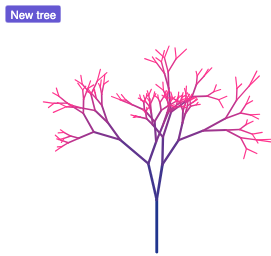
This example shows how to style a fractal tree in GeoGebra by changing segment color and line thickness so that each iteration level becomes visually distinguishable. It demonstrates the phenomenon of self-similar growth produced by an iterative construction: the same branching rule is applied repeatedly to create finer branches. The key math concepts include fractal geometry and iterative generation, where visual attributes (color/width) can be mapped to iteration depth. Construction-wise, it uses Segment and Point to define the basic drawable branches, Dilate to scale geometry for new generations, IterationList to generate all steps’ objects in a structured way, and Element to retrieve specific elements from the generated lists for styling. The construction summary indicates interactive controls (button1/button2/button3), parameters such as f and n, base points (A, B, C, D, E), and per-level outputs (Ln, L1–L8) that hold the segment collections to which thickness/color are applied. Suitable for advanced high school, undergraduate visualization/modeling, and anyone learning how to connect iterative mathematical rules with graphical styling.
GeoGebra Commands & Parameters
Segment((0, 0), (0, 2)) → fPoint(f, 0) → APoint(f, 1) → BDilate(Rotate[A, pi + (random() * pi / 4), B], 0.5 + (0.5 * random()), B) → CDilate(Rotate[A, pi - (random() * pi / 4), B], 0.5 + (0.5 * random()), B) → DDilate(Rotate[A, pi + pi / 8 + (random() * pi / 4), B], 0.5 + (0.5 * random()), B) → EIterationList(Flatten[Zip[Grow[s], s, level]], level, {{f}}, 8) → ListAllElement(ListAll, 1) → L1Element(ListAll, 2) → L2Element(ListAll, 3) → L3Element(ListAll, 4) → L4Element(ListAll, 5) → L5Element(ListAll, 6) → L6Element(ListAll, 7) → L7Element(ListAll, 8) → L8
AI Drawing Prompt Reference
Draw a fractal tree starting from a vertical trunk at the bottom. At the top of the trunk, three branches split off with random angles and lengths, and each branch repeats the same branching rule for eight iterations, creating finer and denser foliage. Each iteration level uses a distinct color and line thickness, progressing from dark and thick at the base to light and thin at the tips, making the levels visually distinct. The tree shows self-similar growth with slight randomness, maintaining a balanced and symmetric appearance.
The prompt above was compiled from the original drawing commands and is for reference only.