
Fractal Curves: Iterative Geometric Construction via Rotation and Polyline
Loading the math board and drawing, please wait…
In collections
Developing games and puzzles with 3D printing for STEAM
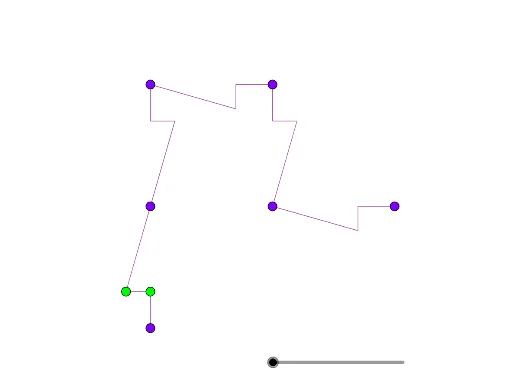
This example demonstrates how to generate fractal curves with self-similar structures by repeatedly rotating and connecting polylines. The core mathematical concepts include fractal geometry, iterative transformations, geometric interpretation of complex numbers, and geometric distribution. The construction uses GeoGebra's PolyLine command to create an initial polyline, then applies the Rotate command to produce rotated copies, iterating step by step to form multiple fractal branches. Key objects include vertices A, B, C, D, E, and iterative points A1 through A6. Suitable for high school and above, this example is ideal for exploring fractal geometry, geometric transformations, and recursive patterns. By adjusting rotation angles and iteration counts, learners can observe how different fractal shapes emerge, deepening their understanding of self-similarity and iterative processes.
GeoGebra Commands & Parameters
PolyLine(B, G, H, A) → fPolyLine(A, H, G, B) → A1Rotate(A, π, B) → A'Rotate(H, π, B) → H'Rotate(G, π, B) → G'Rotate(B, π, B) → B'PolyLine(A', H', G', B') → B1Rotate(PolyLine[Translate[A, C - B], Translate[H, C - B], Translate[G, C - B], Translate[B, C - B]], π / 2, C) → C1Rotate(C1, π / 2, D) → D1Rotate(D1, ((-π)) / 2, E) → E1Rotate(Dilate[{A1, B1, C1, D1, E1}, 1 / sqrt(5), A], atand(2), A) → A2Rotate(A2, π, B) → B2Rotate(Translate[A2, C - B], π / 2, C) → C2Rotate(C2, π / 2, D) → D2Rotate(D2, ((-π)) / 2, E) → E2Rotate(Dilate[{A2, B2, C2, D2, E2}, 1 / sqrt(5), A], atan(2), A) → A3Rotate(A3, π, B) → B3Rotate(Translate[A3, C - B], π / 2, C) → C3Rotate(C3, π / 2, D) → D3Rotate(D3, ((-π)) / 2, E) → E3Rotate(Dilate[{A3, B3, C3, D3, E3}, 1 / sqrt(5), A], atan(2), A) → A4Rotate(A4, π, B) → B4Rotate(Translate[A4, C - B], π / 2, C) → C4Rotate(C4, π / 2, D) → D4Rotate(D4, ((-π)) / 2, E) → E4Rotate(Dilate[{A4, B4, C4, D4, E4}, 1 / sqrt(5), A], atan(2), A) → A5Rotate(A5, π, B) → B5Rotate(Translate[A5, C - B], π / 2, C) → C5Rotate(C5, π / 2, D) → D5Rotate(D5, ((-π)) / 2, E) → E5Rotate(Dilate[{A5, B5, C5, D5, E5}, 1 / sqrt(5), A], atan(2), A) → A6Rotate(A6, π, B) → B6Rotate(Translate[A6, C - B], π / 2, C) → C6Rotate(C6, π / 2, D) → D6Rotate(D6, ((-π)) / 2, E) → E6
AI Drawing Prompt Reference
Draw a fractal curve by repeatedly rotating and connecting polylines to create self-similar structures. Start with an initial polyline, then rotate and connect its copies around a point to form multiple fractal branches. Show the iterative process of rotation and connection to observe the formation of the fractal pattern. Key objects include the initial polyline and its rotated copies, which form a complex fractal structure through repeated transformations.
The prompt above was compiled from the original drawing commands and is for reference only.