
Four Basic Geometric Transformations: Rotation, Reflection, Dilation & Translati
Loading the math board and drawing, please wait…
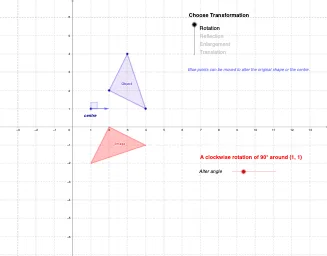
This GeoGebra applet interactively demonstrates the four fundamental geometric transformations: rotation, reflection, dilation (enlargement), and translation. Key mathematical concepts covered: ① Rotation - rotating a figure around a point by a specified angle; ② Reflection - creating a mirror image across a line; ③ Dilation - scaling a figure proportionally from a center point; ④ Translation - moving a figure along a vector. Construction details: Uses the Polygon command to create the original polygon, then applies Rotate for rotation, Mirror for reflection, Dilate for scaling, and Translate with Vector for translation. Additional tools including Angle, Line, and Ray are used to visualize key elements during transformations. This example is ideal for middle and high school mathematics classes to demonstrate the properties of geometric transformations or for students to explore the characteristics of these four transformations independently.
GeoGebra Commands & Parameters
Polygon(C, D, B) → poly1, b, c, dDilate(C, a, A) → C'_1Dilate(D, a, A) → D'_1Dilate(B, a, A) → B'_1Polygon(C'_1, D'_1, B'_1) → poly1'_1, b', c', d'Ray(A, C) → eRay(A, B) → fRay(A, D) → gTranslate(C, Vector[(horz, vert)]) → C'_2Translate(D, Vector[(horz, vert)]) → D'_2Translate(B, Vector[(horz, vert)]) → B'_2Polygon(C'_2, D'_2, B'_2) → poly1'_2, b'_1, c'_1, d'_1Vector(C, C'_2) → uVector(B, B'_2) → vVector(D, D'_2) → wRotate(C, (-α), A) → C'_3Rotate(D, (-α), A) → D'_3Rotate(B, (-α), A) → B'_3Polygon(C'_3, D'_3, B'_3) → poly1'_3, b'_2, c'_2, d'_2Point(xAxis) → ELine(F, E) → hMirror(C, h) → C'Mirror(D, h) → D'Mirror(B, h) → B'Polygon(C', D', B') → poly1', b'_3, c'_3, d'_3Vector(A, G) → zAngle(G, A, H) → β
AI Drawing Prompt Reference
Create a triangle from three distinct points in an initial position, and choose a reference center point for transformations. Draw rays from the center toward the triangle’s vertices to show key directions. Perform an enlargement about the center to get the three corresponding enlarged vertices, then connect them to form a new triangle. Next translate the enlarged triangle by the same displacement: move each enlarged vertex along the same direction and connect the moved vertices into another triangle, indicating the translation using vectors from each original enlarged point to its translated position. Rotate the triangle around the same center by a given angle to obtain a third triangle. Finally, draw a mirror line passing through a specified reference point and reflect the rotated vertices across this line to form the mirror triangle, using an angle marking at the center to represent the rotation-related angle.
The prompt above was compiled from the original drawing commands and is for reference only.