
Fortune Wheel Probability Demo
Loading the math board and drawing, please wait…
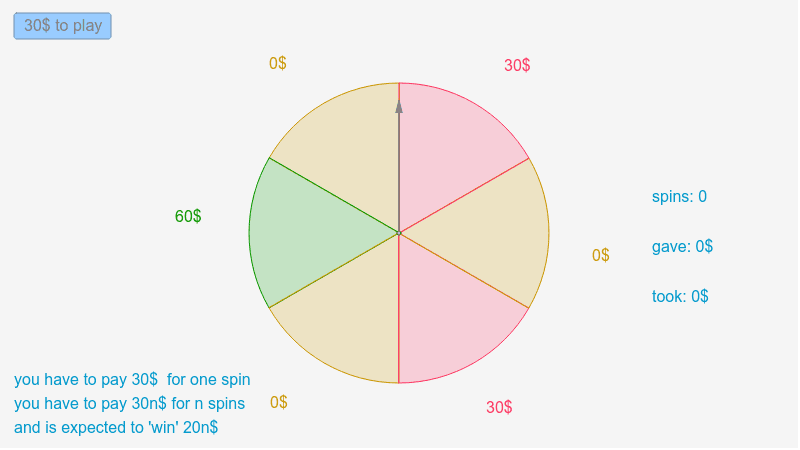
This example demonstrates a probability distribution on a fortune wheel with random element selection. Core math concepts include Probability & Statistics, Vector Transformation, and Geometric Construction. It leverages GeoGebra commands like RandomElement, If, Sequence, Element, Distance, and Vector. Suitable for high school mathematics education to understand the application of probability and geometric transformations.
GeoGebra Commands & Parameters
RandomElement({1, 2, 3, 4, 5, 6}) → bIf(b ≟ 1, Random[-59, -1], If[b ≟ 2, Random[-119, -61], If[b ≟ 3, Random[-179, -121], If[b ≟ 4, Random[-239, -181], If[b ≟ 5, Random[-299, -241], Random[-359, -301]]]]]) → φSequence(Rotate[E, (60 * i + ω)°, D], i, 0, 6) → list1Sequence(CircleSector[D, Element[list1, k], Element[list1, k + 1]], k, 1, 6) → list2Element(list2, 1) → oElement(list2, 2) → pElement(list2, 3) → qElement(list2, 4) → rElement(list2, 5) → sElement(list2, 6) → tDistance(D, E) → DEVector(D, A) → uIf(b ≟ 1 ∨ b ≟ 3 ∨ b ≟ 5, 0, If[b ≟ 6 ∨ b ≟ 4, 1, 2]) → b_1
AI Drawing Prompt Reference
Create a fortune wheel with six sectors, each assigned random angle ranges to demonstrate a probability distribution. Connect a vector from the center to show vector transformation effects. Highlight different sectors based on a randomly selected element, and calculate the distance between the vector and the center point.
The prompt above was compiled from the original drawing commands and is for reference only.