
Forces on a Sphere in a Wedge
Loading the math board and drawing, please wait…
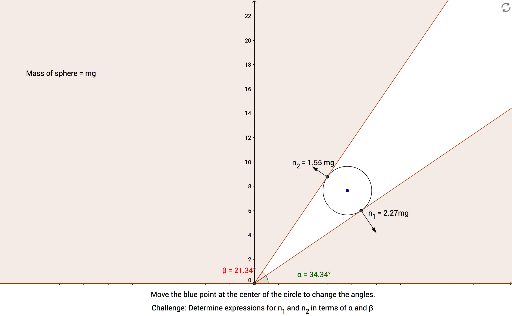
This example demonstrates the analysis of forces acting on a sphere within a wedge, focusing on vector decomposition, 2D geometry, tangent lines, angle calculations, and the construction of circles and polygons. Key GeoGebra commands and objects used include Polygon, Point, Circle, Intersect, Tangent, Angle, Line, and Vector. Suitable for high school students and educators studying the intersection of mechanics and geometry.
GeoGebra Commands & Parameters
Polygon(P, Q, R, S) → poly3, p_1, q_1, r_1, s_1Point(xAxis) → KPointIn(poly3) → ACircle(A, 2) → cIntersect(xAxis, yAxis) → BTangent(B, c) → f, gPoint(f) → HPoint(g) → IAngle(xAxis, f) → αAngle(f, g) → βIntersect(c, f, 1) → CIntersect(c, g, 1) → DLine(C, A) → hLine(D, A) → iCircle(D, sin(α) / sin(β)) → dCircle(C, sin(α + β) / sin(β)) → eIntersect(d, i, 2) → FIntersect(e, h, 2) → GVector(D, F) → uVector(C, G) → vPolygon(H, L, K, B) → poly2, k, p, q, rPolygon(J, E, I, B) → poly1, j, l, m, nPoint(n) → MPoint(q) → NSemicircle(M, N) → sPoint(s) → OPointIn(poly3) → U
AI Drawing Prompt Reference
Draw a sphere within a wedge, analyzing the forces acting on it. Start by sketching the wedge shape and place a sphere inside it. Then, draw tangent lines from the sphere's contact points with the wedge. Calculate the angles between these tangents and the coordinate axes. Based on these angles and the sphere's position, construct two helper circles and draw lines from their intersections with the tangents. Finally, enclose the sphere with two polygons using these lines and tangents, and represent the forces acting on the sphere with vectors.
The prompt above was compiled from the original drawing commands and is for reference only.