
Force on Simply Supported Beam
Loading the math board and drawing, please wait…
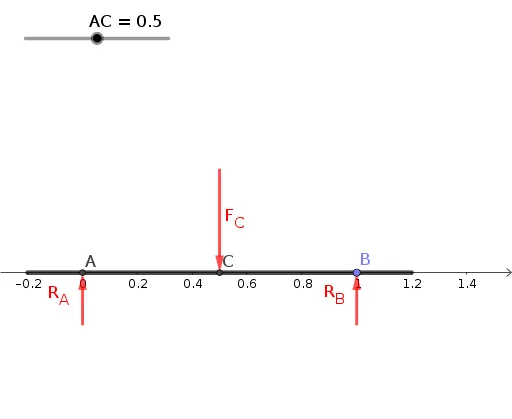
This example demonstrates the force analysis on a simply supported beam under different forces. Key mathematical concepts include vectors, geometric construction, and coordinate geometry. Using GeoGebra commands such as Vector, Segment, and ConstructionStep, the decomposition and synthesis of forces are visually demonstrated. Suitable for courses in mechanics and engineering.
GeoGebra Commands & Parameters
ConstructionStep() → cnIntersect(xAxis, yAxis) → APoint(xAxis) → BVector(D, C) → F_CVector(F, A) → R_AVector(E, B) → R_BSegment(G, H) → f
AI Drawing Prompt Reference
Draw a simply supported beam and apply different forces on it. Start by drawing the intersection point A of the x-axis and y-axis, then draw point B on the x-axis. Next, draw vector F_C from point D to point C, vector R_A from point F to point A, and vector R_B from point E to point B. Finally, draw line segment f from point G to point H, representing the beam.
The prompt above was compiled from the original drawing commands and is for reference only.