
Flip Flop Reflection
Loading the math board and drawing, please wait…
In collections
Congruence (CO) Cluster
Congruence (Vol 1)
Congruence (Vol 1) Over 80 Resources
CCSS High School: Geometry (Congruence) Volume 1 S N ATTAR
Geometry (Congruence) Volume 1
CCSS High School: Geometry (Congruence) Volume 1
CCSS High School: Geometry (Congruence) Volume 1
CCSS High School: Geometry (Congruence) Volume 1
CCSS High School: Geometry (Congruence) Volume 1
CCSS High School: Geometry (Congruence) Volume 1
CCSS High School: Geometry (Congruence) Volume 1
CCSS High School: Geometry (Congruence) Volume 1
CCSS High School: Geometry (Congruence) Volume 1
CCSS High School: Geometry (Congruence) Volume 1
CCSS High School: Geometry (Congruence) Volume 1
CCSS High School: Geometry (Congruence) Volume 1
CCSS High School: Geometry (Congruence) Volume 1
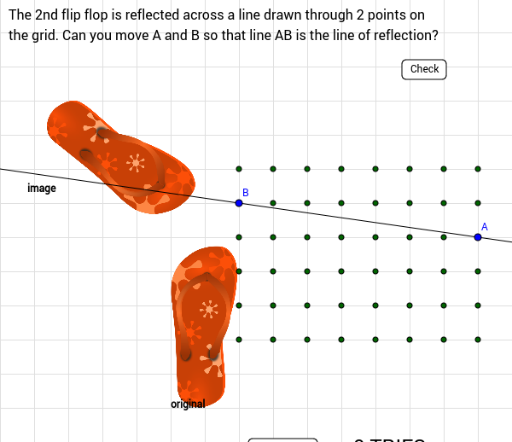
This example demonstrates the process of generating triangles through reflection and flipping operations. It involves core mathematical concepts such as geometric transformations (reflection), triangle construction, and coordinate geometry. Key construction points include the use of GeoGebra commands/objects like Sequence, RandomElement, Line, If, Mirror, Corner, and Polygon. Suitable for high school mathematics teaching to understand geometric transformations and the application of probability statistics.
GeoGebra Commands & Parameters
Sequence(Sequence[(i, j), i, 2, 9], j, 2, 7) → list1RandomElement(RandomElement[list1]) → Y2RandomElement(RandomElement[list1]) → YLine(A, B) → aIf(Y2 ≠ Y, Y2, RandomElement[RandomElement[list1]]) → ZLine(Y, Z) → bMirror(F1, b) → F1'Mirror(F2, b) → F2'Mirror(pic2, b) → pic2'Corner(pic2, 3) → F3Corner(pic2, 4) → F4Mirror(F3, b) → F3'Mirror(F4, b) → F4'Corner(5) → C5If((ymax - ymin) / (xmax - xmin) < r, ymin + (r * (xmax - xmin)), ymax) → ymIf((ymax - ymin) / (xmax - xmin) < r, xmax, xmin + (ymax - ymin) / r) → xmCorner(1) → ECorner(3) → FMirror(pic2, a) → pic2'_1Corner(pic2'_1, 1) → F1'_1Polygon(Corner[pic2'_1, 1], Corner[pic2'_1, 2], Corner[pic2'_1, 3], Corner[pic2'_1, 4]) → poly1, c, d, e, f
AI Drawing Prompt Reference
Create a visual example demonstrating the generation of triangles through reflection and flipping operations, highlighting geometric transformations. Start by randomly selecting two points, connecting them to form a line, then randomly choose another point on this line to complete a triangle. Reflect this triangle across the initial line to create two symmetric triangles. Further manipulate one of the triangles using multiple reflections and flips to form a complex geometric pattern, showcasing the application of probability and statistics.
The prompt above was compiled from the original drawing commands and is for reference only.