
Flight Simulator: 3D Geometric Demonstration of Hyperbola and Secant Lines
Loading the math board and drawing, please wait…
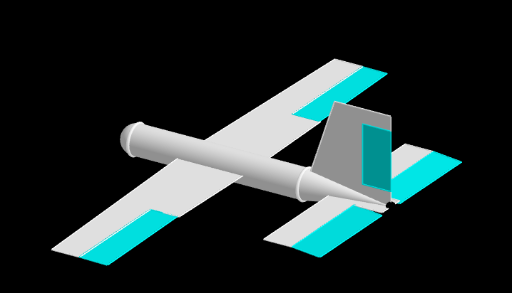
This interactive GeoGebra example, titled 'Flight Simulator', presents a three-dimensional geometric scene that visually demonstrates the combination of hyperbolas, secant lines, similar triangles, rectangles, and squares. The core mathematical concepts involve the properties of hyperbolas, intersections of secant lines with curves, proportional relationships in similar triangles, and the construction of planar shapes within a 3D space. The construction utilizes GeoGebra commands such as Point, Cylinder, Cone, Sphere, Polygon, Intersect, Segment, Rotate, PointIn, and Line, creating a rich set of objects including points A through I, numerous segments (a, b, c, d, e, f, g, h, i, j, k, l, m, n, p, q, r, s, t), polygons poly1, poly2, poly3, and various surfaces like cylinders, cones, and spheres. This example is suitable for high school or early college students, serving as a vivid tool for understanding the intersection of analytic geometry and solid geometry. It can also be used in mathematical modeling or computer-assisted geometry instruction, helping learners connect abstract conic section concepts with intuitive 3D visual simulations.
GeoGebra Commands & Parameters
Point(xAxis) → ACylinder(A, B, 0.5) → a, c, d, bCone(B, C, 0.5) → e, f, gSphere(A, 0.5) → hPolygon(B, (4, 0, 3), (6, 0, 3), (6, 0, 2.5), (5, 0, 2.5), (5, 0, 0.5), (6, 0, 0.5), C, B) → poly1, b_1, i, j, k, l, m, n, c_1, b_2Intersect(k, l) → DIntersect(l, m) → EIntersect(j, k) → FIntersect(n, m) → GPolygon(D, F, G, E, D) → poly2, d_1, f_1, g_1, e_1, d_2Segment(A, B) → pPoint(p) → HPoint(p) → IPolygon(H, (-1, -8), (0, -8), (0, -4), (1, -4), I, H) → poly3, q, r, s, t, a_1, h_1, i_1Intersect(r, s) → JPoint(poly3) → KIntersect(t, s) → LIntersect(t, a_1) → MPolygon(J, M, (1, -8), J) → poly4, j_1, m_1, k_1, j_2Rotate(poly3, 3.141592653589793, xAxis) → poly3'Rotate(poly4, 3.141592653589793, xAxis) → poly4'Polygon(C, (6, -0.5), (5, -0.5), (5, -4), (4, -4), (4, 4), (5, 4), (5, 0.5), (6, 0.5), C) → poly5, c_2, c_3, l_1, n_1, p_1, q_1, r_1, s_1, t_1, a_2Intersect(p_1, n_1) → NPointIn(poly5) → OPolygon(N, O, (6, -0.5), (6, -4), N) → poly6, n_2, o, e_2, f_2, n_3Rotate(poly6, 3.141592653589793, xAxis) → poly6'Rotate(a, up, yAxis) → a'Rotate(e, up, yAxis) → e'Rotate(h, up, yAxis) → h'Rotate(poly3, up, yAxis) → poly3'_1Rotate(poly4, up, yAxis) → poly4'_1Rotate(poly1, up, yAxis) → poly1'Rotate(poly5, up, yAxis) → poly5'Rotate(poly6, up, yAxis) → poly6'_1Rotate(poly2, up, yAxis) → poly2'Rotate(poly3', up, yAxis) → poly3''Rotate(poly4', up, yAxis) → poly4''Rotate(A, up, yAxis) → A'Rotate(B, up, yAxis) → B'Segment(A', B') → p'Rotate(a, ax, p) → a'_1Rotate(poly1, ax, p) → poly1'_1Rotate(poly2, ax, p) → poly2'_1Rotate(poly3, ax, p) → poly3'_2Rotate(poly4, ax, p) → poly4'_2Rotate(poly5, ax, p) → poly5'_1Rotate(poly6, ax, p) → poly6'_2Rotate(h, ax, p) → h'_1Rotate(e, ax, p) → e'_1Rotate(poly3', ax, p) → poly3''_1Rotate(poly4', ax, p) → poly4''_1Rotate(poly6', ax, p) → poly6''Rotate(poly3'_1, ax, p') → poly7Rotate(poly4'_1, ax, p') → poly8Rotate(poly3'', ax, p') → poly3'''Rotate(poly4'', ax, p') → poly4'''Rotate(poly1', ax, p') → poly1''Rotate(poly2', ax, p') → poly2''Rotate(poly5', 3.141592653589793, p') → poly5''Rotate(poly6'_1, ax, p') → poly9Rotate(poly5'', ax, p') → poly5'''Rotate(poly9, 3.141592653589793, p') → poly9'PointIn(poly9) → PPointIn(poly9) → QSegment(P, Q) → g_2Rotate(poly9, (-up), g_2) → poly9'_2PointIn(poly5''') → RPointIn(poly5''') → SSegment(S, R) → h_2Rotate(poly9', up, h_2) → poly9''PointIn(poly1'') → TPointIn(poly2'') → USegment(T, U) → i_2Rotate(poly2'', Rudder, i_2) → poly2'''Rotate(poly9'_2, Elevators, g_2) → poly10Rotate(poly9'', (-Elevators), h_2) → poly9'''Segment(J, L) → k_2PointIn(poly8) → VPolygon(J, L, M, V) → poly11, j_3, l_2, m_2, vRotate(poly11, Ailerons, k_2) → poly11'Rotate(poly11', up, yAxis) → poly11''Rotate(M, up, yAxis) → M'PointIn(poly7) → WPointIn(poly7) → ZLine(W, Z) → p_2PointIn(poly7) → A_1PointIn(poly7) → B_1Point(p_2) → C_1Polygon(Z, A_1, B_1, C_1) → poly12, z_1, a_3, b_3, c_4Rotate(poly12, Ailerons, z_1) → poly12'PointIn(poly3''') → D_1PointIn(poly3''') → E_1Line(D_1, E_1) → q_2PointIn(poly3''') → F_1PointIn(poly3''') → G_1Point(q_2) → H_1Polygon(F_1, E_1, H_1, G_1) → poly13, f_3, e_3, h_3, g_3Rotate(poly13, (-Ailerons), f_3) → poly13'Rotate(h', (-Turn), zAxis) → h''Rotate(poly7, (-Turn), zAxis) → poly7'Rotate(poly11, Turn, zAxis) → poly11'_1Rotate(poly12', (-Turn), zAxis) → poly12''Rotate(poly3''', (-Turn), zAxis) → poly14Rotate(poly13', (-Turn), zAxis) → poly13''Rotate(poly5''', (-Turn), zAxis) → poly15Rotate(poly10, (-Turn), zAxis) → poly10'Rotate(poly9''', (-Turn), zAxis) → poly16Rotate(poly1'', (-Turn), zAxis) → poly1'''Rotate(poly2''', (-Turn), zAxis) → poly17Rotate(a', (-Turn), zAxis) → a''Rotate(e', (-Turn), zAxis) → e''PointIn(poly1''') → I_1PointIn(poly17) → J_1Segment(I_1, J_1) → r_2Rotate(poly17, (-Turn), r_2) → poly17'Rotate(A', Turn, zAxis) → A''Rotate(B', Turn, zAxis) → B''Rotate(A', (-Turn), zAxis) → A''_1Rotate(B', (-Turn), zAxis) → B''_1Segment(A''_1, B''_1) → p''Rotate(h'', (-Turn2), zAxis) → h'''Rotate(a'', (-Turn2), zAxis) → a'''Rotate(e'', (-Turn2), zAxis) → e'''Rotate(poly1''', (-Turn2), zAxis) → poly18Rotate(poly17', (-Turn2), zAxis) → poly17''Rotate(poly15, (-Turn2), zAxis) → poly15'Rotate(poly10', (-Turn2), zAxis) → poly10''Rotate(poly16, (-Turn2), zAxis) → poly16'Rotate(poly7', (-Turn2), zAxis) → poly7''Rotate(poly12'', (-Turn2), zAxis) → poly12'''Rotate(poly14, (-Turn2), zAxis) → poly14'Rotate(poly12'', (-Turn2), zAxis) → poly12'''_1Rotate(poly13'', (-Turn2), zAxis) → poly13'''PointIn(poly12'''_1) → K_1PointIn(poly12''') → L_1Segment(K_1, L_1) → s_2Rotate(poly12''', Turn2, s_2) → poly19PointIn(poly14') → M_1PointIn(poly13''') → N_1Segment(M_1, N_1) → t_2Rotate(poly13''', (-Turn2), t_2) → poly20Rotate(poly13''', (-Turn2), t_2) → poly21PointIn(h''') → O_1PointIn(poly18) → P_1Segment(O_1, P_1) → d_3Rotate(poly7'', (-Turn2), d_3) → poly7'''Rotate(poly19, (-Turn2), d_3) → poly19'Rotate(poly14', (-Turn2), d_3) → poly14''Rotate(poly20, (-Turn2), d_2) → poly20'Rotate(poly20', (-Turn2), d_2) → poly20''Rotate(poly18, (-Turn2), d_2) → poly18'Rotate(poly18, (-Turn2), d_3) → poly18'_1PointIn(poly14'') → Q_1PointIn(poly14') → R_1Rotate(poly17'', (-Turn2), d_3) → poly17'''Rotate(poly20', (-Turn2), d_3) → poly20''_1Rotate(poly15', (-Turn2), d_3) → poly15''Rotate(poly10'', (-Turn2), d_3) → poly10'''Rotate(poly20''_1, (-Turn2), d_3) → poly22Rotate(poly16', (-Turn2), d_3) → poly16''PointIn(poly14'') → S_1PointIn(poly14'') → T_1Line(S_1, T_1) → i_3PointIn(poly14'') → V_1PointIn(poly14'') → W_1Point(i_3) → Z_1Polygon(V_1, W_1, Z_1, T_1) → poly23, v_1, w_1, z_2, t_3Rotate(poly23, Ailerons, t_3) → poly23'Rotate(poly23, Turn2, t_3) → poly23'_1Rotate(poly23', Turn2, t_3) → poly23''PointIn(poly7''') → A_2PointIn(poly19') → B_2Segment(B_2, A_2) → k_3Rotate(poly19', (0.6 * ax), k_3) → poly19''PointIn(poly18'_1) → C_2PointIn(poly17''') → D_2Segment(C_2, D_2) → l_3Rotate(poly17''', (-0.6 * ax), l_3) → poly24PointIn(poly14'') → E_2PointIn(poly14'') → F_2Segment(E_2, F_2) → m_3Segment(E_2, F_2) → p_3Rotate(poly23'', (0.6 * ax), m_3) → poly23'''
AI Drawing Prompt Reference
Create a 3D geometric scene with a cylinder, cone, and sphere along a horizontal axis. Construct multiple polygons in space, forming hyperbolas and secant lines with intersection points that define similar triangles and rectangles. Rotate these shapes around the axis and then around a vertical axis and a segment to create symmetric copies, resulting in a flight-simulator-like composition that illustrates the interplay of conic sections and solid geometry.
The prompt above was compiled from the original drawing commands and is for reference only.