
Finding Unknown Values in Adjacent Angles
Loading the math board and drawing, please wait…
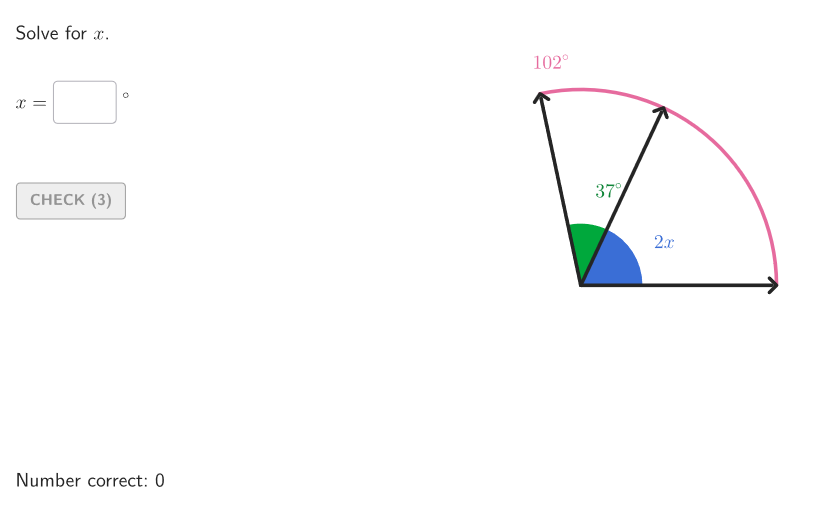
This example demonstrates how to calculate missing angle measures in adjacent angles using angle properties. Key concepts include adjacent angles, angle properties, and linear pair theorems. Construction involves GeoGebra commands like Angle, Polygon, and Segment to create angle diagrams. Suitable for 6-8 grade students for geometry practice and classroom use.
GeoGebra Commands & Parameters
Shuffle(Sequence[(x(A); t), t, 100°, 179°, 1°]) → allBig, {(4; 102*°), (4; 152*°), (4; 139*°), (4; 121*°), (3.9999999999999996; 168*°), (4; 129*°), (4.000000000000001; 125*°), (4; 155*°), (4; 118*°), (4; 128*°), (3.9999999999999996; 108*°), (3.9999999999999996; 165*°), (4; 163*°), (3.9999999999999996; 126*°), (4; 123*°), (4; 103*°), (4; 131*°), (4; 116*°), (3.9999999999999996; 160*°), (3.9999999999999996; 107*°), (4; 110*°), (4.000000000000001; 178*°), (4; 156*°), (3.9999999999999996; 114*°), (4; 162*°), (4; 115*°), (4; 158*°), (3.9999999999999996; 171*°), (4; 113*°), (4; 175*°), (3.9999999999999996; 132*°), (4; 127*°), (4; 159*°), (3.9999999999999996; 122*°), (4; 166*°), (3.9999999999999996; 119*°), (4; 130*°), (3.9999999999999996; 133*°), (4.000000000000001; 149*°), (3.9999999999999996; 173*°), (4; 144*°), (4; 136*°), (4; 143*°), (4; 177*°), (4; 151*°), (4.000000000000001; 174*°), (4; 172*°), (4; 138*°), (3.9999999999999996; 140*°), (4; 167*°), (4; 117*°), (3.9999999999999996; 142*°), (4; 135*°), (4; 147*°), (4; 124*°), (4; 112*°), (4; 145*°), (3.9999999999999996; 100*°), (4; 120*°), (3.9999999999999996; 104*°), (3.9999999999999996; 134*°), (4; 179*°), (4; 146*°), (3.9999999999999996; 141*°), (3.9999999999999996; 169*°), (4; 164*°), (4; 170*°), (4; 111*°), (4; 150*°), (4; 161*°), (4; 101*°), (3.9999999999999996; 105*°), (3.999999999999999; 106*°), (3.9999999999999996; 109*°), (4; 176*°), (4; 137*°), (3.9999999999999996; 157*°), (4; 153*°), (4.000000000000001; 148*°), (4; 154*°)}Shuffle(Sequence[t, t, 20, angBig - 25, 1]) → allAngMini, {65, 32, 63, 50, 33, 54, 35, 20, 39, 66, 41, 31, 30, 70, 49, 67, 77, 57, 56, 61, 22, 44, 43, 72, 40, 53, 25, 62, 51, 42, 37, 46, 52, 45, 47, 23, 59, 58, 26, 71, 28, 73, 64, 34, 27, 76, 29, 69, 24, 48, 38, 36, 55, 68, 75, 74, 60, 21}Element(allAngMini, Mod[countQuestion, Length[allAngMini]] + 1) → angMiniTextfield(input1) → InputBox1TextToUnicode(("" * InputBox1)) → studUniCurrentRotate(A, angMini°, O) → BRotate(A, bigA, O) → AFAngle(B, O, AF) → angBOFTextfield(input2) → InputBox2Polygon(Zip[PixelsToPoint[Corner[1], Corner[3], Corner[5], A], A, {(pixelsLeft, pixelsTop), (pixelsLeft, y(Corner[5]) - pixelsBottom), Corner[5] - (pixelsRight, pixelsBottom), (x(Corner[5]) - pixelsRight, pixelsTop)}]) → borderBoxCorner(5) → layoutAppSizeonboardingTextOffset(Corner[onboardingText, 1], Corner[onboardingText, 3], onboardingCase, Corner[1], Corner[3], Corner[5]) → OnboardingTextOffsetElement({If[layoutX ≟ 16, layoutX - 5, 11], layoutX - 5}, layoutCase) → layoutHintSolnXAngle(A, O, B) → angAOBPoint(Vector[(1.8 * UnitVector[AngularBisector[AA, O, BB]])], 1) → posLabelAOBPoint(Vector[(4.4 * UnitVector[AngularBisector[AA, O, AFF]])], 1) → posLabBigSegment(O, AF) → vertSegment(O, A) → horSegment(O, B') → angSidePoint(Vector[(1.8 * UnitVector[AngularBisector[B', O, AF]])], 1) → posLabelSol2Angle(A, O, B') → solCase1Point(Vector[(1.8 * UnitVector[AngularBisector[A, O, B']])], 1) → posLabelSol1Point(Vector[(2.2 * UnitVector[AngularBisector[BB, O, AFF]])], 1) → posLabelBOFIf(showhint, 3, 0) → speedRotate(A, ((2 * aniSli) * input1°), O) → SASegment(O, SA) → studSideCircleArc(O, A, AF) → cAngle(A, O, SA) → studAng
AI Drawing Prompt Reference
Draw a geometric figure for finding unknown values in adjacent angles. Start with a common vertex, draw a horizontal ray and an oblique ray forming a large angle. Inside this large angle, draw another ray dividing it into two adjacent angles, one with a known measure and the other unknown. Mark each angle with an arc and label the known angle. Place an input box near the unknown angle for the user to enter the answer. The figure should clearly show the vertex, rays, and angle marks, suitable for middle school geometry practice.
The prompt above was compiled from the original drawing commands and is for reference only.