
Finding Unknown Supplementary Angles: Linear Pair Angle Solving
Loading the math board and drawing, please wait…
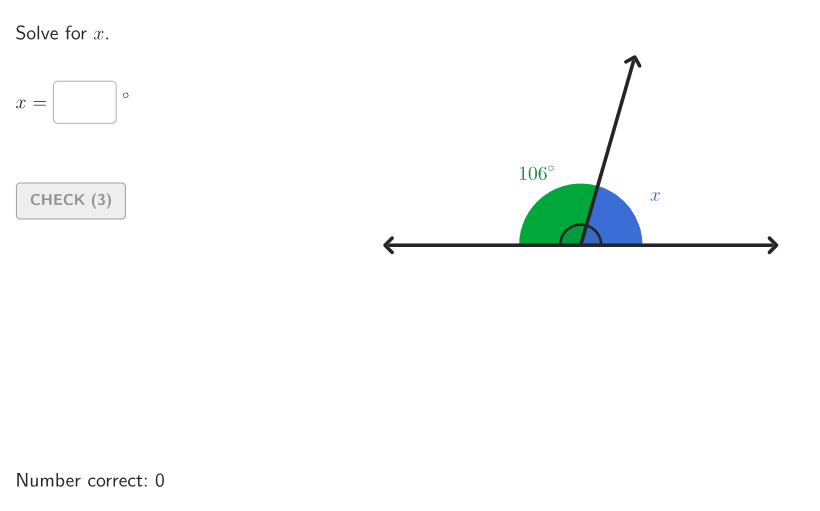
This GeoGebra lesson demonstrates how to find a missing angle measure when two angles form a linear pair (supplementary angles). It focuses on the relationship that supplementary angles sum to 180°, along with related ideas such as adjacent angles and angle measurement. Construction and interaction are built around creating points and angle geometry (Point, Segment, Polygon/angle-related objects), using Angle and Rotate to generate and track angle measures, and providing user input via Textfield/Text/TextToUnicode. The applet then checks responses using conditional logic (If) and interactive controls such as validate, showanswer, showsolution, and hint buttons, with case variation supported by Element and Shuffle. Suitable for grades 6–8 and classroom practice on angle theorems and line-pair properties.
GeoGebra Commands & Parameters
Shuffle(Sequence[t, t, 20, angBig - 25, 1]) → allAngMini, {74, 148, 150, 25, 145, 143, 65, 51, 41, 140, 89, 149, 36, 45, 85, 55, 119, 69, 92, 120, 124, 46, 100, 136, 110, 123, 151, 44, 114, 137, 98, 70, 50, 122, 71, 103, 20, 95, 101, 130, 86, 76, 93, 62, 47, 132, 43, 113, 82, 75, 146, 67, 133, 96, 102, 63, 125, 49, 154, 42, 155, 104, 32, 24, 56, 97, 139, 134, 153, 138, 34, 127, 142, 52, 23, 27, 38, 68, 66, 39, 109, 128, 111, 131, 40, 126, 53, 29, 30, 115, 26, 37, 31, 147, 121, 107, 94, 22, 72, 99, 141, 54, 88, 58, 73, 78, 21, 129, 105, 33, 35, 90, 61, 84, 59, 83, 81, 112, 118, 48, 106, 77, 28, 108, 117, 80, 60, 57, 87, 116, 64, 152, 144, 79, 135, 91}Element(allAngMini, Mod[countQuestion, Length[allAngMini]] + 1) → angMiniTextfield(input1) → InputBox1TextToUnicode(("" * InputBox1)) → studUniCurrentRotate(A, angMini°, O) → BRotate(A, angBig°, O) → AFAngle(B, O, AF) → angBOFAngle(A, O, AF) → bigATextfield(input2) → InputBox2Polygon(Zip[PixelsToPoint[Corner[1], Corner[3], Corner[5], A], A, {(pixelsLeft, pixelsTop), (pixelsLeft, y(Corner[5]) - pixelsBottom), Corner[5] - (pixelsRight, pixelsBottom), (x(Corner[5]) - pixelsRight, pixelsTop)}]) → borderBoxCorner(5) → layoutAppSizeonboardingTextOffset(Corner[onboardingText, 1], Corner[onboardingText, 3], onboardingCase, Corner[1], Corner[3], Corner[5]) → OnboardingTextOffsetElement({If[layoutX ≟ 16, layoutX - 5, 11], layoutX - 5}, layoutCase) → layoutHintSolnXAngle(A, O, B) → angAOBPoint(Vector[(1.8 * UnitVector[AngularBisector[AA, O, BB]])], 1) → posLabelAOBPoint(Vector[(4.4 * UnitVector[AngularBisector[AA, O, AFF]])], 1) → posLabBigSegment(O, AF) → vertSegment(O, A) → horSegment(O, B') → angSidePoint(Vector[(1.8 * UnitVector[AngularBisector[B', O, AF]])], 1) → posLabelSol2Angle(A, O, B') → solCase1Point(Vector[(1.8 * UnitVector[AngularBisector[A, O, B']])], 1) → posLabelSol1Point(Vector[(2.2 * UnitVector[AngularBisector[BB, O, AFF]])], 1) → posLabelBOFIf(showhint, 3, 0) → speedRotate(A, (aniSli * input1°), O) → SASegment(O, SA) → studSideAngle(A, O, SA) → studAng
AI Drawing Prompt Reference
Draw an angle with vertex O, one side as a horizontal ray and the other side as a slanted ray, forming a large angle. Inside this angle, draw another ray from O, dividing it into two adjacent angles. One of these angles has a randomly chosen measure between 20 and 155 degrees, and the other angle is unknown, to be found by the student because the two angles are supplementary (sum to 180 degrees). Label the known angle with its degree measure, and provide a text input box for the student to enter the unknown angle. Also include a hint button that reveals steps or the answer when clicked. The diagram should clearly show the vertex, rays, and angle labels for easy observation and calculation.
The prompt above was compiled from the original drawing commands and is for reference only.