
Finding Missing Values in Venn Diagrams
Loading the math board and drawing, please wait…
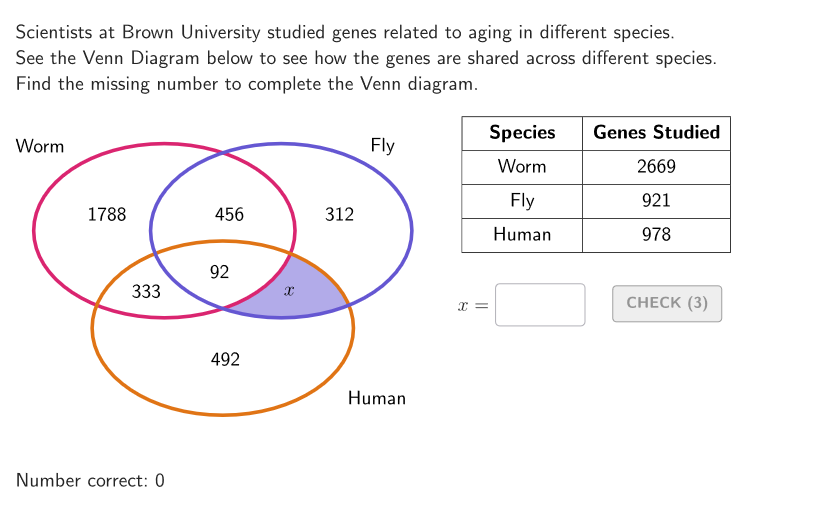
This example demonstrates how to interpret Venn diagrams involving three sets and calculate the missing value in the figure. Key math concepts include set operations and probability & statistics. Construction highlights the use of GeoGebra commands and objects like Shuffle, Element, If, Sequence, Take, Textfield, Corner, PointToPixels, onboardingTextOffset, Vector, Ellipse, Translate. Suitable for students in grades 6-8 to practice solving problems using Venn diagrams.
GeoGebra Commands & Parameters
Shuffle({1, 2, 3, 4, 5, 6, 7}) → allUnknown, {3, 6, 7, 5, 1, 4, 2}Shuffle({1, 2, 3}) → allCaseNum, {1, 3, 2}Element(allUnknown, Mod[countQuestion, Length[allUnknown]] + 1) → currentUnknownElement(allCaseNum, Mod[countQuestion, Length[allCaseNum]] + 1) → caseNumIf(caseNum ≟ 1, 1823, caseNum ≟ 2, 1094, 492) → hIf(caseNum ≟ 1, 367, caseNum ≟ 2, 1150, 61) → gIf(caseNum ≟ 1, 77, caseNum ≟ 2, 207, 92) → fIf(caseNum ≟ 1, 406, caseNum ≟ 2, 218, 333) → dIf(caseNum ≟ 1, 76, caseNum ≟ 2, 237, 456) → bIf(caseNum ≟ 1, 458, caseNum ≟ 2, 1079, 312) → cIf(caseNum ≟ 1, 362, caseNum ≟ 2, 316, 1788) → aSequence(Random[0, 99] / 100, A, 1, 200) → allRandomSeeds, {0.38, 0.45, 0.07, 0.91, 0.74, 0.84, 0.15, 0.22, 0.18, 0, 0.62, 0.55, 0.86, 0.93, 0.81, 0.2, 0.04, 0.43, 0.52, 0.41, 0.01, 0.62, 0.26, 0.4, 0.71, 0.87, 0.44, 0.4, 0.76, 0.6, 0.2, 0.02, 0.14, 0.65, 0.71, 0.58, 0.79, 0.67, 0.84, 0.03, 0.72, 0.67, 0.67, 0.81, 0.41, 0.16, 0.55, 0.83, 0.85, 0.47, 0.53, 0.35, 0.97, 0.99, 0.11, 0.18, 0.5, 0.17, 0.84, 0.9, 0.17, 0.39, 0.8, 0.5, 0.5, 0.45, 0.08, 0.04, 0.88, 0.93, 0.29, 0.14, 0.84, 0.74, 0.91, 0, 0.65, 0.72, 0.9, 0.43, 0.53, 0.36, 0.2, 0.5, 0.99, 0.31, 0.97, 0.33, 0.33, 0.9, 0.56, 0.66, 0.24, 0.4, 0.27, 0.29, 0.42, 0.52, 0.54, 0.21, 0.52, 0.39, 0.05, 0.37, 0.02, 0.58, 0.32, 0.02, 0.13, 0.85, 0.97, 0.34, 0.2, 0.51, 0.3, 0.46, 0.82, 0.89, 0.44, 0.25, 0.79, 0.58, 0.32, 0.12, 0.25, 0.37, 0.2, 0.18, 0.64, 0.15, 0.33, 0.97, 0.79, 0.18, 0.84, 0.4, 0.38, 0.87, 0.28, 0.24, 0.85, 0.83, 0.09, 0.06, 0.49, 0.11, 0.75, 0.91, 0.54, 0.53, 0.65, 0.35, 0.17, 0.16, 0.63, 0.55, 0.01, 0.21, 0.31, 0.46, 0.26, 0.38, 0.45, 0.19, 0.89, 0.2, 0.03, 0.81, 0.19, 0, 0.17, 0.26, 0.97, 0.9, 0.77, 0.98, 0.49, 0.84, 0.14, 0.8, 0.67, 0.39, 0.67, 0.93, 0.35, 0.73, 0.11, 0.41, 0.83, 0.6, 0.4, 0.91, 0.32, 0.88, 0.94, 0.49, 0.39, 0.9, 0.58, 0.58}Take(allRandomSeeds, randIndex, randIndex + numRandoms - 1) → currentRandomSeedsTextfield(input1) → InputBox1Textfield(input2) → InputBox2Corner(5) → layoutAppSizePointToPixels(Corner[onboardingDisplayText, 2], Corner[1], Corner[3], Corner[5]) → layoutOnboardingonboardingTextOffset(Corner[onboardingText, 1], Corner[onboardingText, 3], onboardingCase, Corner[1], Corner[3], Corner[5]) → OnboardingTextOffsetVector(A, J) → uVector(A, T) → vEllipse(A, B, C) → coTranslate(co, v) → moTranslate(co, u) → lu
AI Drawing Prompt Reference
Draw a Venn diagram with three ellipses to represent three sets. The diagram includes other parts obtained by translation and scaling to simulate set intersections. The construction order is: first create a list of random seeds, then select one random seed, then draw the base ellipse, then translate and scale it to get other ellipses, and finally combine them into a complete Venn diagram structure.
The prompt above was compiled from the original drawing commands and is for reference only.