
Finding Equal Area Using Integration
Loading the math board and drawing, please wait…
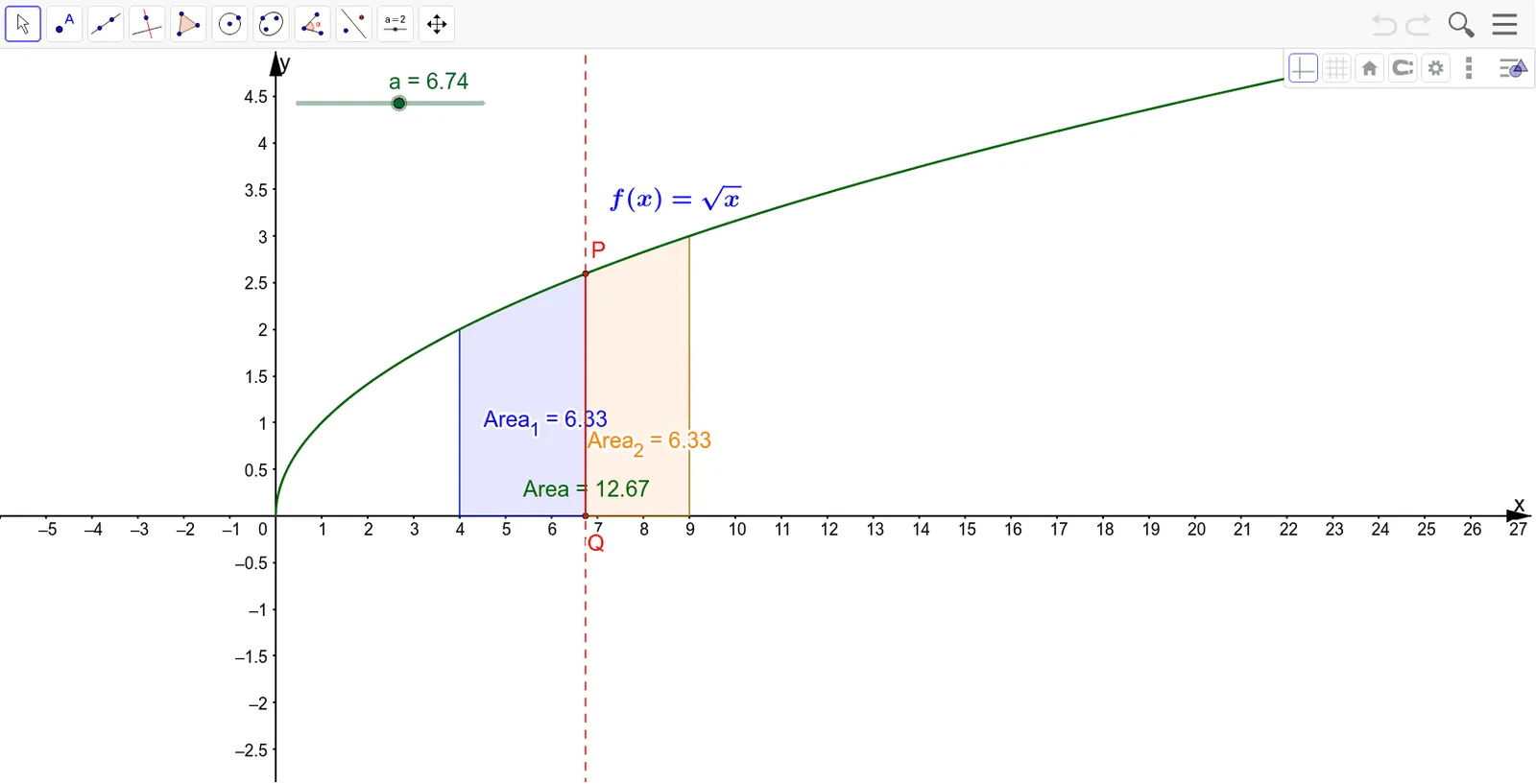
This example demonstrates how to locate a position where two regions bounded by a curve and straight lines have equal area by evaluating definite integrals. Core concepts include definite integration, area computation, the interplay between function graphs and geometric shapes, and algebraic formulation of the equal‑area condition. Construction highlights: the Integral command computes areas Area, Area_1, Area_2 for function f; Segment and Line create segment a, lines g and h, and points P, Q; a text object text1 displays key values. It is suitable for high‑school calculus electives, introductory university calculus courses, and teacher lesson‑preparation to give students a visual grasp of the geometric meaning of integration.
GeoGebra Commands & Parameters
Integral(f, 4, 9) → AreaSegment(P, Q) → gIntegral(f, 4, a) → Area_1Integral(f, a, 9) → Area_2Line(Q, P) → h
AI Drawing Prompt Reference
Draw a function curve with two vertical lines intersecting it, forming two bounded regions. Connect the two intersection points with a horizontal segment, and draw a line through these points. Shade the two regions in different colors and display their area values. Include a movable vertical line that can be adjusted so that the two shaded regions have equal area.
The prompt above was compiled from the original drawing commands and is for reference only.