
Finding Complementary and Supplementary Angles
Loading the math board and drawing, please wait…
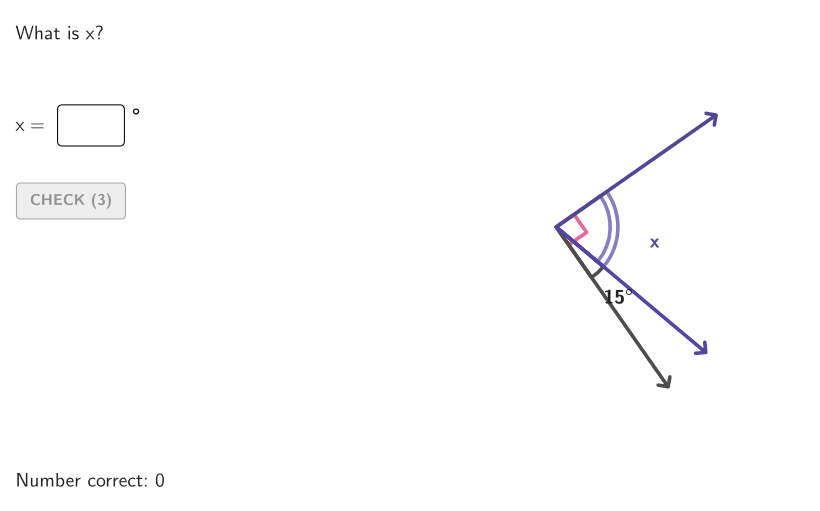
This activity demonstrates the concepts of complementary and supplementary angles using dynamic geometry tools. Key mathematical concepts include angle measurement, complementary and supplementary relationships. Construction involves GeoGebra commands such as Angle, Segment, and Intersect to create angle diagrams. Suitable for students in grades 6-8 for geometry learning and practice.
GeoGebra Commands & Parameters
Shuffle(Sequence[Random[1, 2], t, 1, 100]) → angTypeList, {2, 1, 2, 1, 1, 2, 2, 1, 1, 2, 2, 1, 2, 1, 2, 1, 1, 2, 2, 2, 1, 2, 1, 1, 2, 1, 1, 1, 1, 1, 2, 2, 2, 2, 2, 1, 2, 1, 1, 2, 1, 2, 2, 2, 2, 1, 2, 2, 2, 2, 1, 1, 2, 1, 1, 1, 2, 1, 1, 2, 2, 2, 1, 1, 2, 1, 2, 1, 2, 2, 2, 1, 1, 1, 2, 1, 1, 1, 2, 1, 2, 1, 1, 1, 2, 2, 2, 2, 1, 2, 2, 2, 1, 1, 1, 1, 2, 1, 1, 2}Element(angTypeList, Mod[countAngType, Length[angTypeList]] + 1) → angTypeShuffle(Sequence[Random[14, If[angType ≟ 1, 75, 165]], t, 1, 100]) → angList, {25, 15, 29, 34, 36, 23, 63, 14, 68, 33, 26, 22, 26, 29, 34, 22, 24, 25, 44, 61, 67, 60, 41, 42, 70, 16, 45, 23, 53, 41, 18, 18, 70, 65, 39, 47, 30, 74, 31, 67, 23, 50, 71, 48, 48, 28, 32, 62, 14, 49, 25, 57, 54, 37, 33, 49, 44, 57, 68, 17, 42, 63, 54, 38, 33, 46, 33, 34, 50, 22, 31, 50, 38, 37, 65, 66, 34, 73, 54, 16, 72, 49, 68, 29, 37, 64, 27, 18, 65, 40, 25, 44, 21, 17, 48, 57, 75, 73, 39, 56}Element(angList, Mod[countMeasInt, Length[angList]] + 1) → angMeasIntSequence(Rotate[R, n, K], n, 0, 360°, 5°) → circleGridRandomElement(circleGrid) → ARotate(A, If[angType ≟ 1, 90°, 180°], K) → A'_{1}Rotate(A, angMeasInt°, K) → A'Angle(A', K, A'_{1}) → solAngAngle(A, K, A') → givenAngElement(angTypeList, Mod[countQuestion, 15] + 1) → randomNum2Element(angList, Mod[countQuestion, 20] + 1) → randomNum1Textfield(input1) → InputBox1Textfield(input2) → InputBox2Polygon(Zip[PixelsToPoint[Corner[1], Corner[3], Corner[5], A], A, {(pixelsLeft, pixelsTop), (pixelsLeft, y(Corner[5]) - pixelsBottom), Corner[5] - (pixelsRight, pixelsBottom), (x(Corner[5]) - pixelsRight, pixelsTop)}]) → borderBoxCorner(5) → layoutAppSizeSegment(K, A) → angStartRotate(K, angMeasInt°, K) → K'Segment(K', A') → angEndRotate(K, If[angType ≟ 1, 90°, 180°], K) → K'_{1}Segment(K'_{1}, A'_{1}) → angHintMidpoint(Segment[Rotate[K, givenAng / 2, K], Rotate[A, givenAng / 2, K]]) → L1Circle(K, 6) → cIntersect(c, angEnd) → B,Intersect(c, angHint) → C,Midpoint(B, C) → L2Angle(angStart, angHint) → boxAngAngle(A', K, A'_{1}) → xAngMidpoint(Segment[Rotate[K, missingAng / 2, K], Rotate[A', missingAng / 2, K]]) → LAB
AI Drawing Prompt Reference
Draw a figure with two angles, where one angle is the supplement of another, and the other is the complement of another. First, generate a random angle value, then construct two angles based on this value, where one angle is the supplement of the other, and the other is the complement of the other. Next, draw a circle and find the endpoints of these angles on the circle, then connect these points to form auxiliary lines. Finally, construct a complete figure including these angles and the circle based on their relationships.
The prompt above was compiled from the original drawing commands and is for reference only.