
Find All the Quadrilaterals: Drag-and-Drop Sorting Activity
Loading the math board and drawing, please wait…
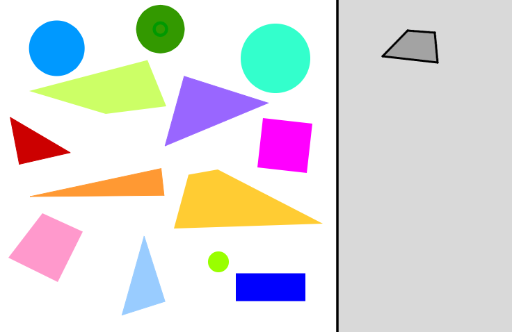
① This interactive GeoGebra example presents a drag-and-drop sorting task where students must identify and move all quadrilaterals into a grey target area, testing their recognition of quadrilateral properties. ② The core mathematical concepts involve the definition and classification of quadrilaterals, including rectangles, parallelograms, trapezoids, and general polygons, along with their angle and side properties. ③ Construction highlights: Based on the construction summary, the example uses Polygon commands to create multiple polygon objects (e.g., poly1, poly2, poly3), and employs Point, PointIn, Centroid, Circle, Segment, Line, OrthogonalLine, Rotate, LineBisector, and Semicircle commands to build auxiliary shapes and interactive elements. The PointIn command is crucial for detecting whether a dragged point falls within the target region, while Rotate and LineBisector may generate symmetric or special quadrilaterals. ④ This activity is suitable for upper elementary to middle school students learning introductory geometry, and serves as an engaging tool for classroom demonstration or self-paced exploration to reinforce quadrilateral classification.
GeoGebra Commands & Parameters
Polygon(O_2, P_2, Q_2, R_2) → Vieleck1, o_2, p_2, q_2, r_2PointIn(Vieleck1) → C_3Point(Circle[C_3, 1]) → H_3Point(Circle[A, 3.514555448417339]) → BPolygon(A, B, C, D) → poly1, a_1, b, c, dPoint(Circle[E, 1.6120794025109306]) → FPolygon(E, F, G, H) → poly2, e, f, g, hPoint(Circle[I, 0.8532877591996734]) → JPolygon(I, J, K, L) → poly3, i, j, k, lPolygon(M, N, 4) → poly4, m, n, p, q, O, PPolygon(Q, P_3, Q_3, R_3) → poly5, r, s, t, f_1Point(Circle[E_1, 1]) → F_1Point(Circle[H_1, 0.7800640999302562]) → I_1Point(Circle[K_1, 1.7596590578859304]) → L_1Point(Circle[N_1, 1.053944970100432]) → O_1Centroid(poly1) → Q_1Centroid(poly2) → R_1Centroid(poly4) → S_1Centroid(poly5) → T_1Centroid(poly3) → V_1Point(Circle[K_2, 0.7823042886243177]) → L_2Polygon(K_2, L_2, M_2, N_2) → poly10, k_2, l_2, m_2, n_2PointIn(Vieleck1) → S_2PointIn(Vieleck1) → T_2PointIn(Vieleck1) → U_2PointIn(Vieleck1) → V_2Circle(S_2, 0.7) → c_1Circle(T_2, 1) → d_1Circle(U_2, 0.3) → e_1Circle(V_2, 0.8) → g_1PointIn(Vieleck1) → W_2Point(Circle[W_2, 0.7]) → Z_2Segment(W_2, Z_2) → q_1Point(Circle[Z_2, 1.5]) → A_3Segment(Z_2, A_3) → r_1Point(Circle[A_3, 2]) → B_3Segment(A_3, B_3) → s_1Polygon(Z_2, A_3, B_3) → Vieleck2, b_3, z_2, a_3Line(H_3, C_3) → h_1Point(h_1) → E_3OrthogonalLine(E_3, h_1) → i_1Point(i_1) → F_3Point(i_1) → G_3Polygon(F_3, G_3, H_3) → Vieleck3, k_1, l_1, m_1Segment(C_3, H_3) → j_1PointIn(Vieleck1) → D_3Point(Circle[D_3, 1.5]) → I_3Segment(D_3, I_3) → t_1Rotate(I_3, 30°, D_3) → J_3LineBisector(I_3, J_3) → b_1Point(b_1) → K_3Polygon(I_3, J_3, K_3) → Vieleck4, k_3, i_3, j_3PointIn(Vieleck1) → L_3Point(Circle[L_3, 1]) → M_3Segment(L_3, M_3) → n_1Point(Circle[L_3, 1.5]) → N_3Segment(L_3, N_3) → p_1Semicircle(N_3, M_3) → c_2Point(c_2) → O_3Polygon(O_3, N_3, M_3) → Vieleck5, m_3, o_3, n_3