
Figure 8 Surface
Loading the math board and drawing, please wait…
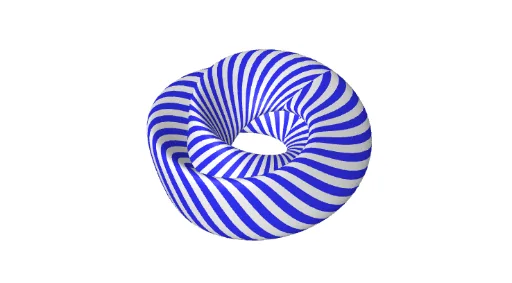
① This example demonstrates a three-dimensional surface shaped like the digit '8', constructed parametrically in GeoGebra to show a self-intersecting ring-like surface. ② Core mathematical concepts include parametric surfaces, curves and surfaces in 3D space, and the use of sequences to generate point grids, with quadrilateral and triangle mesh subdivisions. ③ Construction highlights: from the summary, the Sequence command is used to generate point lists, a slider (n) controls subdivision density, a button (button1) triggers updates or animations, and variables (a, p, gx, gy, gz) along with color objects (black, white) define the surface rendering, resulting in a figure-eight mesh. ④ Suitable for high school to undergraduate mathematics, this example helps learners understand parametric equations, 3D surface modeling, and the integration of sequences with dynamic geometry in GeoGebra, also useful for mathematical visualization or artistic design.
GeoGebra Commands & Parameters
Sequence(Surface[gx(u, v), gy(u, v), gz(u, v), u, (-π), π, v, i + π / n, i + (2 * π / n)], i, 0, (2 * π), (2 * π / n)) → blackSequence(Surface[gx(u, v), gy(u, v), gz(u, v), u, (-π), π, v, i, i + π / n], i, 0, (2 * π), (2 * π / n)) → white
AI Drawing Prompt Reference
Create a 3D figure-eight shaped surface defined by parametric equations, featuring a self-intersecting ring-like structure. Use a sequence to generate point grids and display quadrilateral and triangle mesh subdivisions. A slider controls the density of subdivisions, and a button triggers updates or animations. Variables define the surface rendering in black and white, forming a mesh effect suitable for high school to undergraduate mathematics, demonstrating parametric equations, 3D surface modeling, and the integration of sequences with dynamic geometry.
The prompt above was compiled from the original drawing commands and is for reference only.