
Fence Optimization: Maximizing Rectangular Area with Fixed Perimeter
Loading the math board and drawing, please wait…
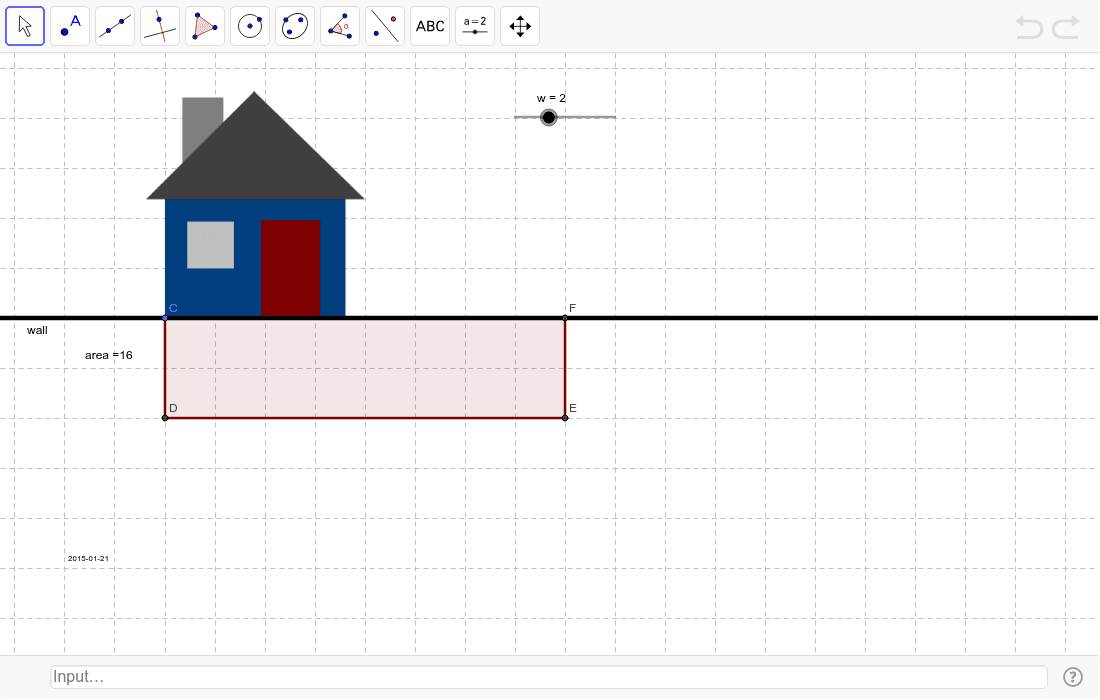
This example demonstrates a classic geometric optimization problem: given a fixed total fence length, how to design a rectangular enclosure (with one side using an existing wall) to maximize the enclosed area. Core mathematical concepts include the rectangle area formula, perimeter constraints, quadratic function extrema, and symmetry. Construction highlights: using GeoGebra commands such as Line, Point, OrthogonalLine, Circle, Intersect, and Polygon to build the wall, the rectangular fence, and its dynamic dimensions; dragging points or sliders changes the fence length, showing real-time area updates, and geometric mean or variance concepts help analyze the optimal solution. Suitable for upper middle school to high school students, this example aids in understanding quadratic function optimization, geometric constraints, and algebraic modeling, and serves as an introductory case for mathematical modeling or inquiry-based learning.
GeoGebra Commands & Parameters
Line(A, B) → wallPoint(wall) → COrthogonalLine(C, wall) → bCircle(C, w) → cIntersect(c, b, 1) → DOrthogonalLine(D, b) → dCircle(D, l) → eIntersect(e, d, 1) → ECircle(C, l) → fIntersect(f, wall, 2) → FPolygon(C, D, E, F) → poly1, c_1, d_1, e_1, f_1
AI Drawing Prompt Reference
Draw a horizontal line segment representing an existing wall. Place a point on this wall as one corner of a rectangular enclosure. From this point, draw a perpendicular line upward with a fixed length to set the width, creating the second corner. From the second corner, draw a horizontal line to the right with another fixed length to set the length, creating the third corner. Then, from the first corner, measure the same length along the wall to the right to get the fourth corner. Connect these four corners to form a rectangle, and display its area value. When dragging the point on the wall or adjusting the two length parameters, the rectangle's shape and area update in real time, allowing observation of the maximum area under a fixed total perimeter.
The prompt above was compiled from the original drawing commands and is for reference only.