
Fantasy Spirograph
Loading the math board and drawing, please wait…
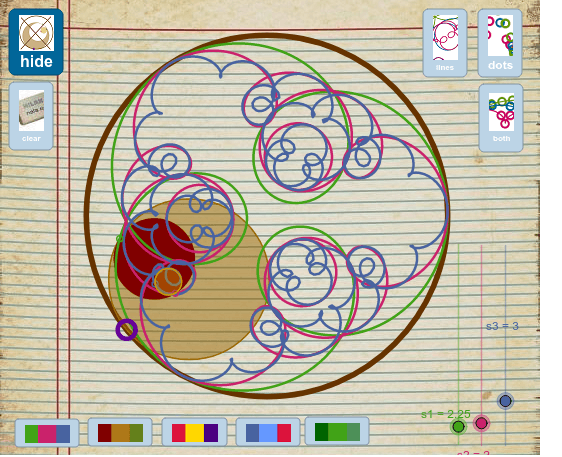
This example demonstrates the creation of a fantasy spirograph through rotation and locus construction. Key math concepts include rotation, angles, circles, vectors, and parametric equations. It utilizes GeoGebra commands like Circle, Point, Segment, Intersect, Angle, Rotate, and Locus. Suitable for high school students learning parametric equations, geometric constructions, and locus problems.
GeoGebra Commands & Parameters
Circle(A, R) → cPoint(c) → BCircle(B, r1) → dSegment(B, A) → aIntersect(d, a, 1) → CCircle(C, r1) → ePoint(c) → DAngle(D, A, B) → alphaRotate(B, (s1' * alpha), C) → B'Angle(B, C, B') → αLocus(B', B) → lugar1Segment(C, B') → bCircle(B', r2) → fIntersect(f, b, 1) → ECircle(E, r2) → gRotate(B', ((s2' * s1') * alpha), E) → B''Angle(B', E, B'') → βLocus(B'', B) → lugar2Segment(E, B'') → hCircle(B'', r3) → kIntersect(k, h, 1) → FCircle(F, r3) → pRotate(B'', (((s3' * s2') * s1') * alpha), F) → B'''Angle(B'', F, B''') → γLocus(B''', B) → lugar3Circle(E, B') → q
AI Drawing Prompt Reference
Create a fantasy Spirograph by rotation and locus construction. Start by drawing a circle c, then take point B on circle c and draw circle d with B as center. Connect B and A, and the intersection is point C. Draw circle e with C as center. Then rotate B to B' with angle α, rotate B' to B'' with angle β, and finally rotate B'' to B''' with angle γ, forming three loci lugar1, lugar2, and lugar3.
The prompt above was compiled from the original drawing commands and is for reference only.