
Extracting a Square Root with a Semicircle
Loading the math board and drawing, please wait…
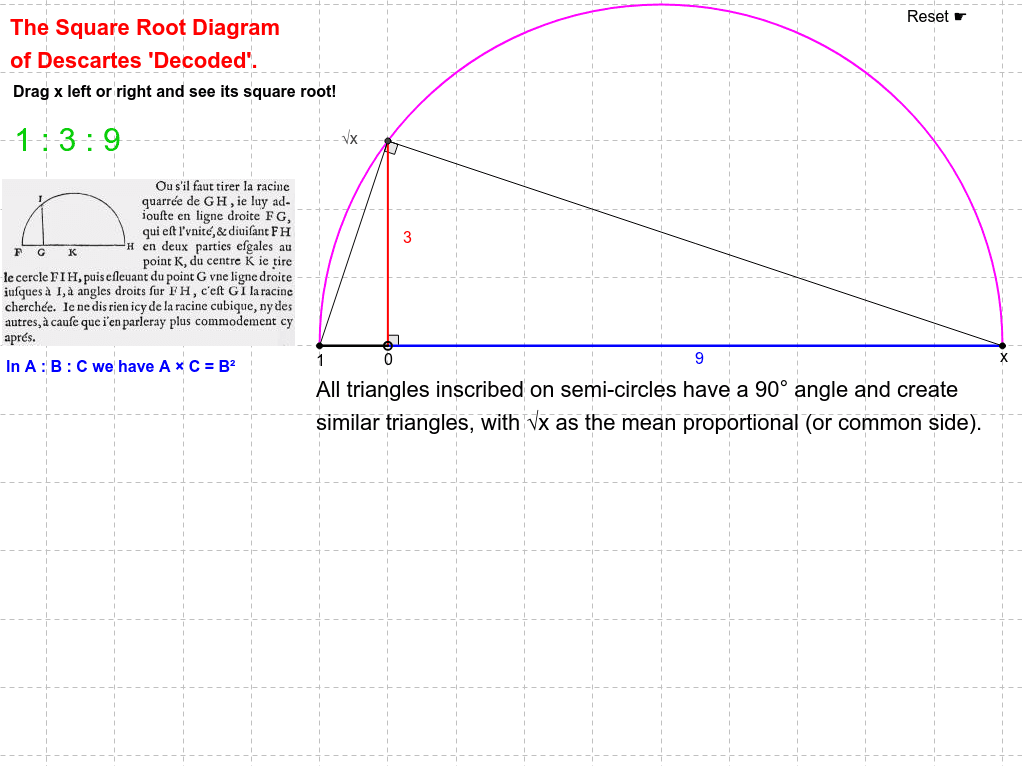
This example demonstrates how to geometrically construct a square root using a semicircle. Key math concepts include circles, line segments, angles, and geometric constructions. It involves commands like Point, LineBisector, Semicircle, Intersect, Segment, and Angle to show the process of building a square root from a unit circle. Suitable for middle school and above students learning geometric constructions and square root concepts.
GeoGebra Commands & Parameters
Point(xAxis) → UnityPoint(xAxis) → BLineBisector(Unity, B) → aSemicircle(Unity, B) → cIntersect(c, yAxis, 1) → CSegment(D, B) → bSegment(D, C) → dSegment(Unity, D) → eSegment(Unity, C) → fSegment(C, B) → gAngle(B, C, Unity) → αAngle(B, D, C) → β
AI Drawing Prompt Reference
Draw a semicircle with its diameter on the x-axis and one endpoint at the origin. Draw a line segment from the origin to the intersection of the semicircle with the y-axis, which is the perpendicular bisector of the diameter. Connect the origin to another point on the semicircle, and then connect this point to the intersection of the semicircle with the y-axis. Also, connect the origin to this point. Finally, measure the angles formed by the intersection point on the y-axis, the other point on the semicircle, and the origin, as well as the angle formed by the intersection point on the y-axis, the other point on the semicircle, and itself.
The prompt above was compiled from the original drawing commands and is for reference only.