
Bharatiya-Style Multiplication on a Plane via Parallelogram and Log Functions
Loading the math board and drawing, please wait…
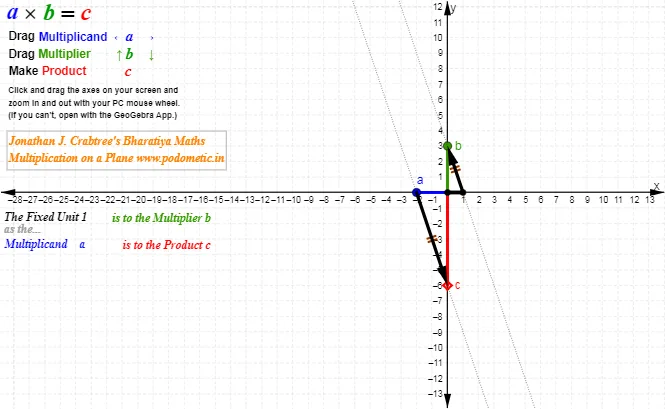
This example demonstrates a geometric visualization of multiplication on the plane, showing how multiplicative relationships can be represented using structured lines and constructed figures. It connects a parallelogram/parallel-line setup with logarithmic function ideas to convey the transformation from product-based relations to additive or proportional ones in a geometric way. Key concepts include multiplication with natural numbers, coordinate-geometry-style constraints (lines, intersections, segment constructions), and the use of logarithmic functions to encode proportional/compositional relationships. Construction-wise, it relies on GeoGebra commands Point, Line/Segment, Intersect, and Vector to create key vertices and intersection points, enforce the required linear alignments, and use vectors to build consistent geometric relations; named objects such as A, O, B, D, E and multiple labeled text elements (e.g., text1_1, text1_2, text1_3) organize the diagram for interpretation. Suitable for high-school to early-undergraduate geometry, function transformation lessons, and classroom demonstrations focused on linking geometry with log-based reasoning.
GeoGebra Commands & Parameters
Point(xAxis) → AIntersect(xAxis, yAxis) → OSegment(O, A) → aPoint(yAxis) → BSegment(O, B) → bPoint(xAxis) → CSegment(O, C) → cSegment(A, B) → dLine(C, d) → eIntersect(e, yAxis) → DSegment(C, D) → fSegment(O, D) → gVector(A, B) → uVector(C, D) → vPoint(u) → ELine(E, B) → hLine(C, D) → i
AI Drawing Prompt Reference
Draw a plane geometry figure with points O, A, B, C, D, and E. O is the intersection of the x-axis and y-axis, A is on the x-axis, B is on the y-axis, and C is also on the x-axis. Draw a line segment through A and B, and a line segment through C and D, where D is the intersection of the line through C parallel to line segment AB and the y-axis. Draw a line segment using the vector from A to B, and another using the vector from C to D, where E is the endpoint of the vector from A to B. Draw a line through E and B, and another through C and D.
The prompt above was compiled from the original drawing commands and is for reference only.