
Geometric Visualization Linking Indian Logic Ideas with Descartes’ Multiplicatio
Loading the math board and drawing, please wait…
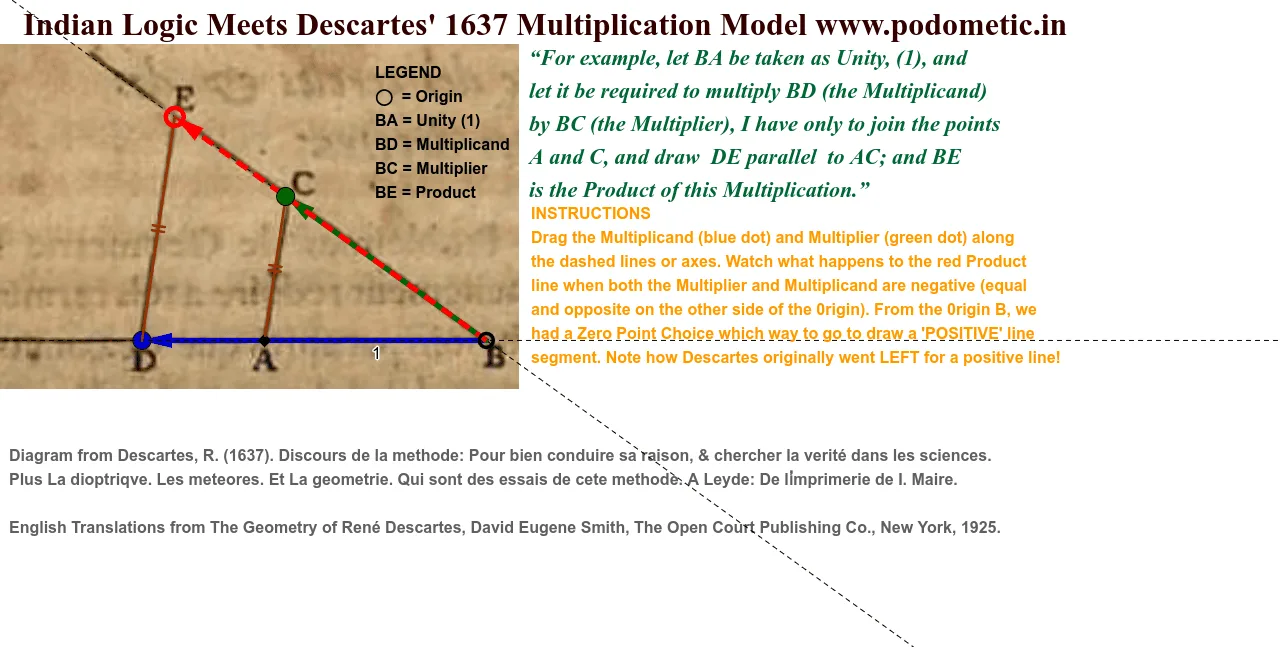
This example demonstrates how Descartes’ multiplication can be represented as a sequence of precise geometric construction steps, connecting a logic/measurement viewpoint to measurable geometric relations. It uses circle-line intersection geometry and vector-based representation to turn multiplication (and related exponent/root thinking) into a visually checkable construction. Key math concepts include geometric construction with constraints (intersections, rays/segments), vectors for encoding directions and quantities, and the correspondence between multiplication and geometric patterns that suggest powers and roots. Construction-wise, the model relies on commands such as Intersect, Line, Point, Ray, Segment, Vector, and Circle; it creates key labeled points (e.g., U, B, A, D, K, etc.) as intersection nodes, builds measuring rays/segments to drive the construction, and employs Vector plus text/annotation objects to express the involved directional/metric relationships. The scene also incorporates elements associated with 3D/solid intuition (e.g., cone-related objects), making it suitable for connecting 2D constructions with spatial visualization. Intended for secondary school enrichment through early university geometry/math visualization, especially for lessons on geometric construction, vector geometry, and interpreting algebraic operations through geometry.
GeoGebra Commands & Parameters
Intersect(xAxis, yAxis) → BLine(U, B) → sPoint(xAxis) → APoint(xAxis) → DRay(B, K) → lPoint(s) → LSegment(B, A) → UnitSegment(B, D) → aSegment(B, C) → bLine(B, C) → cSegment(A, C) → eLine(A, e) → fLine(D, f) → gIntersect(g, c) → ESegment(B, E) → abSegment(A, C) → iSegment(D, E) → jSegment(B, A) → hLine(B, D) → dVector(B, D) → uPoint(c) → FPoint(c) → GPoint(c) → HPoint(d) → IRay(B, D) → kCircle(A, L, D) → rPoint(s) → TLine(T, A) → tPoint(s) → JVector(T, J) → u_1Point(t) → PSegment(P, J) → ACLine(D, AC) → nIntersect(s, n) → VVector(T, V) → wSegment(V, D) → DE
AI Drawing Prompt Reference
Visualize multiplication through geometric constructions involving axes, lines, and circles. Start with the intersection of two axes, then create a line connecting this point to another on an axis. Use this as a base to form geometric relationships through intersections of circles and lines, vector representations, and measuring segments, illustrating the visual connection between multiplication and powers or roots. Include vectors for direction, annotations for relationships, and elements suggesting three-dimensional space to link 2D constructions with spatial visualization.
The prompt above was compiled from the original drawing commands and is for reference only.