
Exponential Growth & Decay Function Models
Loading the math board and drawing, please wait…
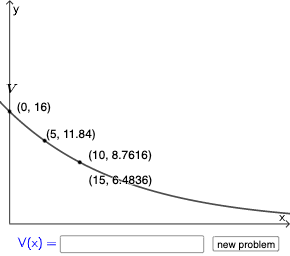
This example demonstrates how to construct exponential growth and decay function models using GeoGebra. Key mathematical concepts include exponential functions and their applications. Commands used include Random, If, and Textfield, involving dynamic construction of functions. Suitable for high school mathematics education and learning.
GeoGebra Commands & Parameters
Random(5, 20) → bRandom(2, 10) → timeRandom(1, 2) → nRandom(10, 50) → pIf(n ≟ 1, (b * (1 + p / 100)^(x / time)), (b * (1 - p / 100)^(x / time))) → fTextfield(g) → InputBox1
AI Drawing Prompt Reference
Draw an exponential growth or decay function model. The graph includes a function f that dynamically generates based on random parameters b, time, n, and p. If n is not equal to 1, function f represents exponential growth; otherwise, it represents exponential decay. Parameters b range from 5 to 20, time from 2 to 10, n from 1 to 2, and p from 10 to 50. The graph also includes an input box for entering parameters. The construction order is to first generate random parameters, then build the function based on conditions, and finally add the input box.
The prompt above was compiled from the original drawing commands and is for reference only.