
Exploring Volume Ratios of Rectangular Prisms
Loading the math board and drawing, please wait…
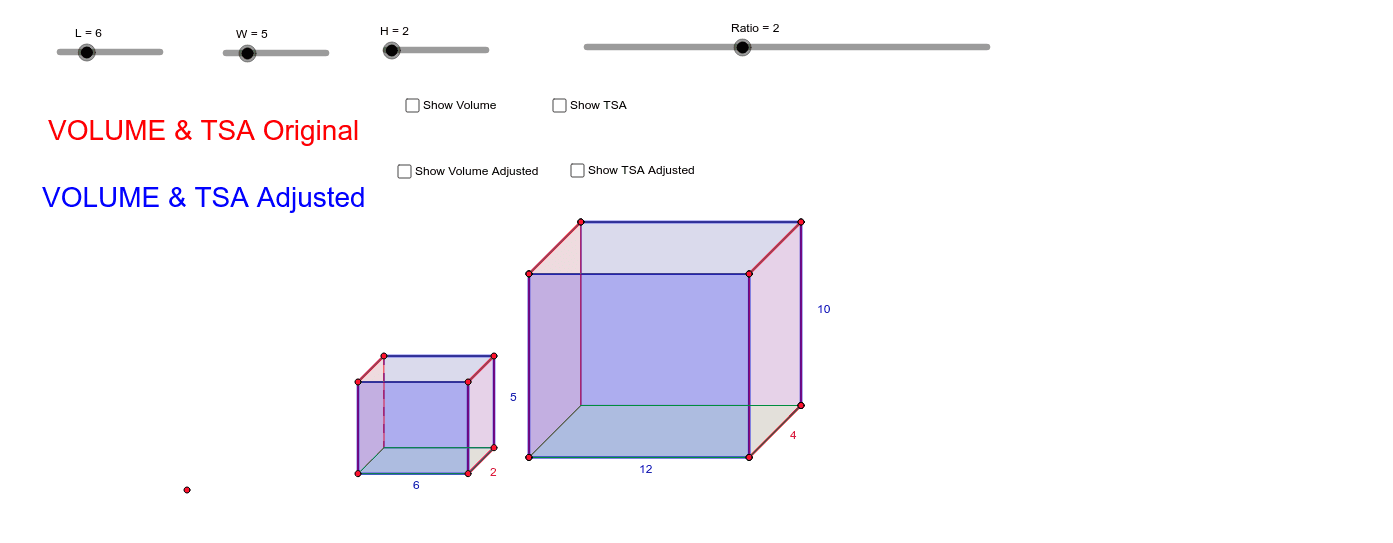
This GeoGebra example lets users construct rectangular prisms with adjustable dimensions and compute their volume ratios interactively.
① It illustrates the volume formula V = L·W·H, ratio reasoning, and how scaling dimensions affect the volume ratio, reinforcing concepts of solid geometry and proportional reasoning.
② The construction uses GeoGebra tools such as Point, Segment, Polygon, Rotate, Dilate, Distance, and sliders for L, W, H to generate two prisms (poly1, poly2) dynamically and display their volume ratio.
③ Designed for high‑school or early‑university students studying geometry, algebra, and mathematical modeling, it supports lessons on spatial visualization, variable manipulation, and inquiry‑based learning.
GeoGebra Commands & Parameters
Point(Circle[A, L]) → BSegment(A, B) → aOrthogonalLine(A, a) → bOrthogonalLine(B, a) → cCircle(A, W) → dCircle(B, W) → eIntersect(d, b) → C, DIntersect(e, c) → E, FPolygon(D, A, B, F) → poly1, d_1, a_1, b_1, fRotate(B, 135*°, F) → B'Angle(B, F, B') → αRotate(A, 135*°, D) → A'Angle(A, D, A') → βRotate(F, 315*°, B) → F'Angle(F', B, F) → γRotate(D, 315*°, A) → D'Angle(D', A, D) → δRay(D, A') → gRay(A, D') → hRay(F, B') → iRay(B, F') → jCircle(D, H) → kIntersect(k, g) → G,Circle(A, H) → pIntersect(p, h) → I,Circle(F, H) → qIntersect(q, i) → J,Circle(B, H) → rIntersect(r, j) → K,Polygon(G, I, K, J) → poly2, g_1, i_1, k_1, j_1Polygon(D, G, I, A) → poly3, d_2, g_2, i_2, a_2Polygon(J, K, B, F) → poly4, j_2, k_2, b_2, f_1Polygon(G, D, F, J) → poly5, g_3, d_3, f_2, j_3Polygon(A, I, K, B) → poly6, a_3, i_3, k_3, b_3Text(VOLUME) → text1Dilate(D, Ratio, M) → D'_1Dilate(A, Ratio, M) → A'_1Dilate(B, Ratio, M) → B'_1Dilate(F, Ratio, M) → F'_1Polygon(D'_1, A'_1, B'_1, F'_1) → poly1', d'_1, a'_1, b'_1, f'_1Dilate(G, Ratio, M) → G'Dilate(I, Ratio, M) → I'Dilate(K, Ratio, M) → K'Dilate(J, Ratio, M) → J'Polygon(G', I', K', J') → poly2', g', i', k', j'Dilate(D, Ratio, M) → D'_2Dilate(G, Ratio, M) → G'_1Dilate(I, Ratio, M) → I'_1Dilate(A, Ratio, M) → A'_2Polygon(D'_2, G'_1, I'_1, A'_2) → poly3', d'_2, g'_1, i'_1, a'_2Dilate(J, Ratio, M) → J'_1Dilate(K, Ratio, M) → K'_1Dilate(B, Ratio, M) → B'_2Dilate(F, Ratio, M) → F'_2Polygon(J'_1, K'_1, B'_2, F'_2) → poly4', j'_1, k'_1, b'_2, f'_2Dilate(G, Ratio, M) → G'_2Dilate(D, Ratio, M) → D'_3Dilate(F, Ratio, M) → F'_3Dilate(J, Ratio, M) → J'_2Polygon(G'_2, D'_3, F'_3, J'_2) → poly5', g'_2, d'_3, f'_3, j'_2Dilate(A, Ratio, M) → A'_3Dilate(I, Ratio, M) → I'_2Dilate(K, Ratio, M) → K'_2Dilate(B, Ratio, M) → B'_3Polygon(A'_3, I'_2, K'_2, B'_3) → poly6', a'_3, i'_2, k'_2, b'_3Distance(k_2, a_1) → lDistance(a'_1, k_1) → mDistance(k', k'_1) → nText(ADJ) → text4Text(TSA) → text5Text(TSAADJ) → text6
AI Drawing Prompt Reference
Draw two rectangular prisms, each defined by points A, B, C, D, E, F. The first prism is poly1, the second is poly2, generated via rotation and dilation. Include a text label for volume ratio and show the adjustable dimensions. Construction order: first draw auxiliary points and lines, then build the first prism, then generate the second via rotation and dilation, and finally label the volume ratio.
The prompt above was compiled from the original drawing commands and is for reference only.