
Exploring Trigonometric Ratios via Similarity Transformations
Loading the math board and drawing, please wait…
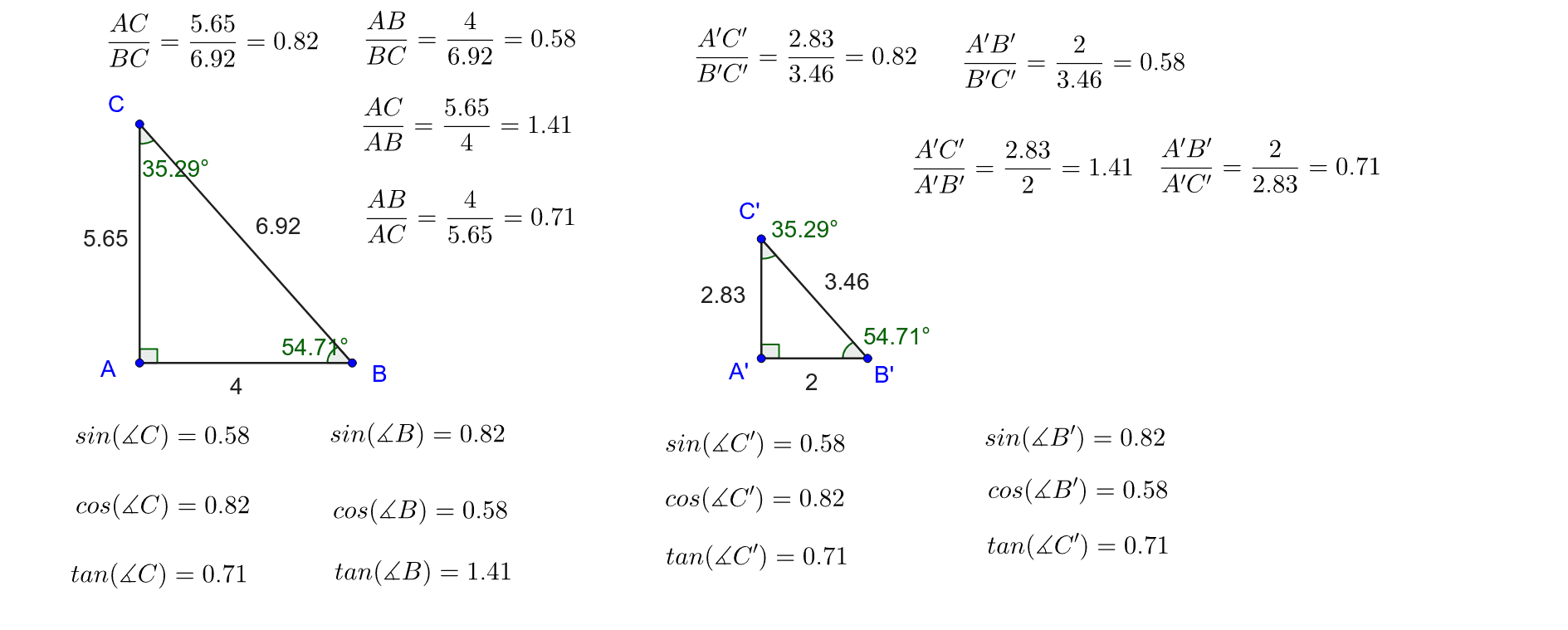
① This example visualizes how the trigonometric ratios (sine, cosine, tangent) of an acute angle in a right triangle can be understood using a similarity transformation (dilation) of a reference triangle. ② Core concepts include right triangles, similarity, ratios of opposite/adjacent/hypotenuse sides, angle measurement, and coordinate geometry. ③ Construction highlights: define points A, B, C to form a base triangle, apply the Dilate command to create a similar copy, draw lines and orthogonal lines, measure angles and distances with Angle and Distance commands, and display the computed ratios via text objects. ④ Suitable for high school geometry and trigonometry classes, as well as interactive lessons on similarity and trigonometric functions.
GeoGebra Commands & Parameters
Line(A, B) → fOrthogonalLine(A, f) → gPoint(g) → CPolygon(A, B, C) → poly1, AB, BC, ACDilate(A, 0.5, D) → A'Dilate(B, 0.5, D) → B'Dilate(C, 0.5, D) → C'Polygon(A', B', C') → poly1', A'B', B'C', A'C'Angle(poly1) → α, β, γAngle(poly1') → δ, ε, ζDistance(C', B') → C'B'
AI Drawing Prompt Reference
Draw a right triangle with one leg horizontal and the other vertical, forming a right angle at their intersection. Use the right-angle vertex as the center to shrink the entire triangle by half, creating a smaller similar triangle inside sharing that vertex. Label all three angles of the large triangle and the corresponding angles of the small triangle. Measure the length of the vertical leg of the small triangle (opposite the acute angle at the horizontal leg) and display this measurement. The figure illustrates how trigonometric ratios remain invariant under similarity transformations.
The prompt above was compiled from the original drawing commands and is for reference only.